

1. INTRODUCTION
Every broken link on your website is a tiny leak in your SEO bucket. It wastes crawl budget, frustrates users, and signals to Google that your site isn’t well maintained. In 2026, with Core Web Vitals and page experience more important than ever, broken links also indirectly hurt user engagement — a key ranking factor.
The good news? You don’t need a paid Ahrefs subscription to fix them. Free tools like Dead Link Checker and Dr. Link Check can scan your entire site, and Google Search Console already reports internal 404s. This guide will show you exactly how to find, fix, and prevent broken links without spending a dime.
Here’s what you’ll learn:
- How to find broken links for free using three different methods.
- A step‑by‑step process to fix them (update, redirect, or remove).
- Platform‑specific fixes for WordPress, Shopify, and static sites.
- How to monitor your site going forward so links never rot again.
Let’s stop the leaks.
2. WHAT ARE BROKEN LINKS AND WHY THEY DAMAGE SEO
A broken link is a hyperlink that points to a non‑existent page or resource. When a user clicks it, they get a 404 Not Found error (or similar). Broken links fall into three main categories:
- Internal broken links – links to pages on your own site that no longer exist.
- External broken links – links pointing to other websites that have moved or shut down.
- Broken image links – image files that fail to load because the source URL is wrong.
Why do they hurt SEO?
- Crawl budget waste – Googlebot spends time crawling dead URLs instead of valuable pages.
- Poor user experience – visitors who hit 404s often leave immediately, increasing bounce rate.
- Link equity loss – internal broken links stop PageRank from flowing between pages.
- Trust signal decline – a site riddled with broken links looks abandoned, and Google notices.
The good news? Fixing broken links is one of the easiest technical SEO wins you can implement.
3. TYPES OF BROKEN LINKS (INTERNAL, EXTERNAL, IMAGES)
Let’s quickly define each type so you know what you’re dealing with.
Internal broken links occur when you delete a page or change its URL without updating links pointing to it. Example: a blog post links to /old‑service, but you changed that page to /new‑service. Fixing these is entirely under your control.
External broken links happen when the site you linked to removes content or changes its URL structure. You can’t control the other site, but you can update or remove the link. External broken links are especially common in older blog posts.
Broken images are often missed because they don’t trigger a classic 404 page; the image just fails to render. They harm user experience and can hurt your image SEO.
Use a link checker that catches all three types.
4. HOW TO FIND BROKEN LINKS FOR FREE: A 7‑STEP AUDIT
(This section maps to the HowTo schema later.)
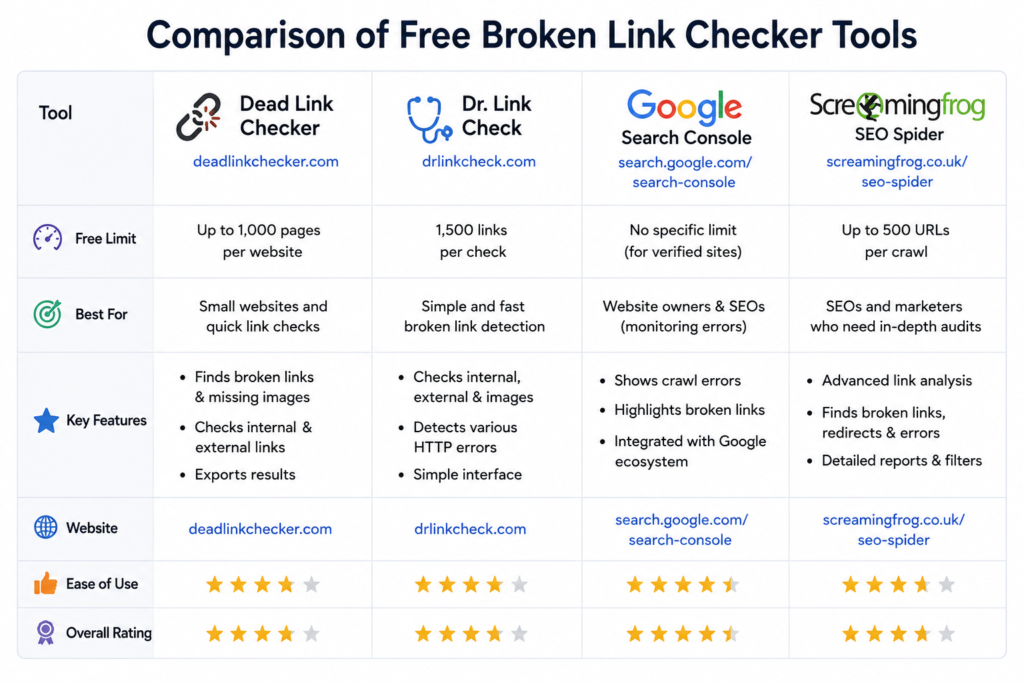
Step 1 – Choose your free tool.
For small sites, use Dead Link Checker (no signup, scans up to 2,000 pages) or Dr. Link Check (unlimited but slower). Google Search Console also reports internal 404s for free, but only for pages Google has already crawled.
Step 2 – Run a full site crawl.
Enter your homepage URL into the tool and start the scan. Dead Link Checker will email you a report; Dr. Link Check runs in the browser. The tool will list every broken URL, along with the page where the broken link appears.
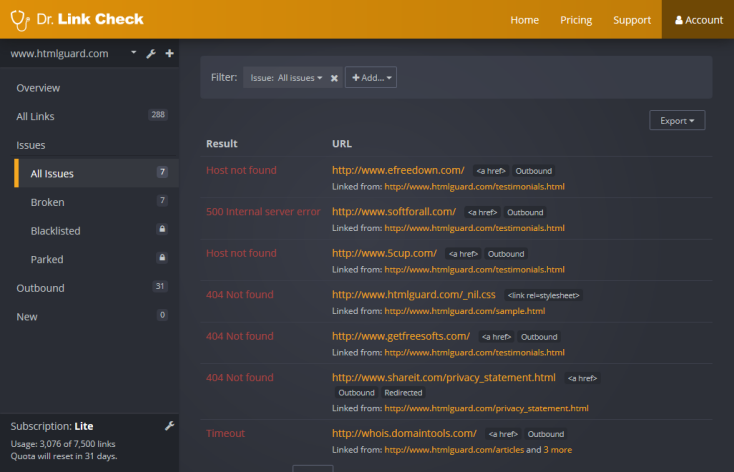
Step 3 – Export and filter the report.
Remove false positives: some tools flag links that are temporarily slow or blocked by robots.txt. Focus on genuine 404s and 410 errors.
Step 4 – Verify the broken links manually.
Click a few broken links yourself (in an incognito window) to confirm they really return 404. Sometimes a page is accessible but the tool saw a different response code.
Step 5 – Categorize each broken link.
Mark each as internal, external, or image. This will dictate your fix: update, redirect, or remove.
Step 6 – Prioritise high‑traffic pages.
If a broken link sits on a page that gets 1,000 visits a month, fix it first. Use Google Analytics or Search Console to see which pages are popular.
Step 7 – Re‑crawl after fixing.
Once you’ve made changes, run the checker again to confirm no broken links remain.
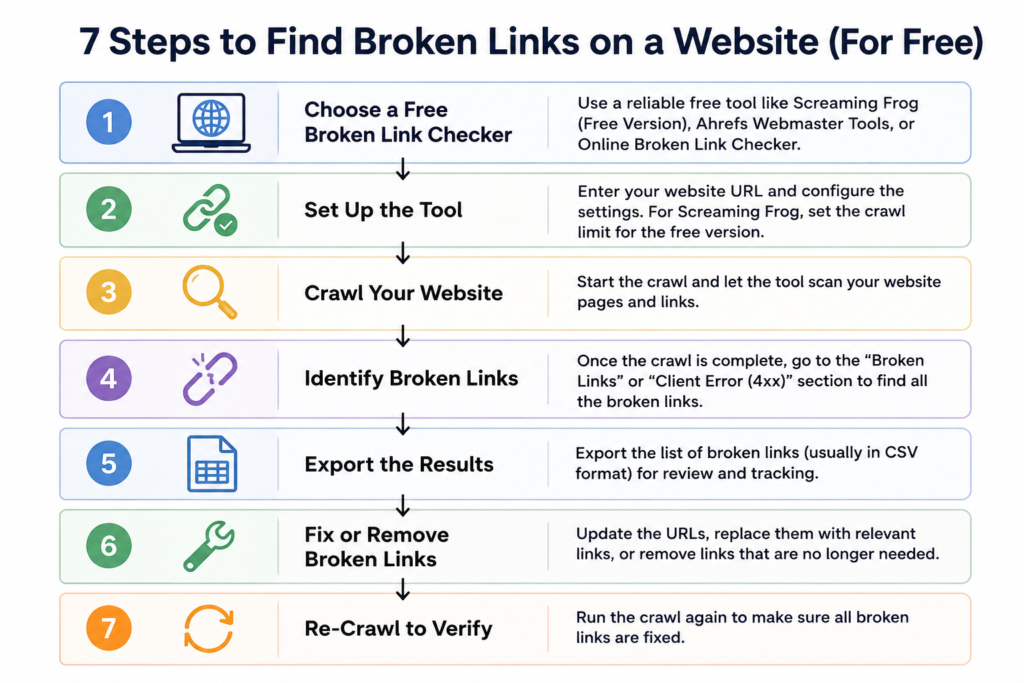
5. BEST FREE BROKEN LINK CHECKER TOOLS COMPARED
| Tool | Free Limit | Best For | Key Features |
|---|---|---|---|
| Dead Link Checker | 2,000 pages | Small to medium sites | Email report, checks internal/external links, simple interface |
| Dr. Link Check | Unlimited (browser) | Thorough audits, larger sites | Real‑time scan, filters, exports CSV, checks images |
| Google Search Console | Unlimited (own site) | Internal 404 monitoring | Native Google data, free forever, page‑level detail |
| Screaming Frog SEO Spider | 500 URLs | Desktop crawling, advanced users | Detailed reports, custom filters, redirect chains |
| Ahrefs Webmaster Tools | Limited free plan | Backlink and internal link analysis | Automatic weekly crawls, broken outbound links |
Our recommendation: Start with Dead Link Checker for a quick, no‑login scan. Use Dr. Link Check for a deeper audit, and rely on Google Search Console for ongoing monitoring. If your site has fewer than 500 URLs, Screaming Frog’s free version is unbeatable for detail.
6. HOW TO FIX BROKEN LINKS: 5‑STEP PROCESS (HOW‑TO)
(This is the detailed process for the HowTo schema.)
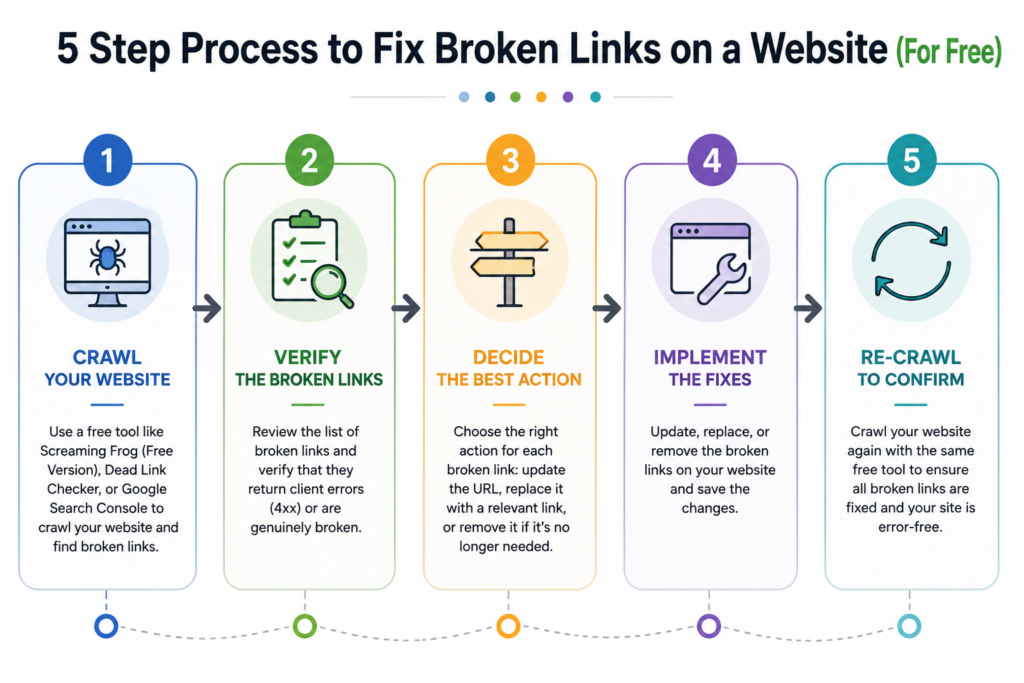
Step 1 – Run a crawl using a free tool and export the report.
Open Dead Link Checker or Dr. Link Check, enter your homepage, and let it scan. Export the list of broken URLs. If you use Screaming Frog, apply a filter for “Client Error (4xx)” responses.
Step 2 – Verify each broken URL is genuinely 404.
Click the broken link from the report (or paste it into your browser). If the page loads fine, the tool was wrong; ignore it. If you get a 404, proceed to Step 3.
Step 3 – Decide the fix.
Ask: Can I update the link to a live page? Is there a relevant page to redirect to? Or should I just remove the link? For internal links, update the link to the correct URL. For external links, either replace with a working alternative or remove the anchor. For image links, re‑upload or correct the URL.
Step 4 – Implement the fix.
- Update link: Edit the post/page in your CMS, find the broken link, and replace it with the correct URL.
- Redirect: If the old URL has backlinks, set up a 301 redirect from the broken URL to the new page. In WordPress, use a redirect plugin like Redirection. On Apache, add to
.htaccess:Redirect 301 /old-page https://yoursite.com/new-page - Remove link: Delete the anchor text or the whole link, leaving the content intact.
Step 5 – Re‑crawl and verify.
Run the checker again. If the broken links are gone, you’re done. If not, repeat the process until clean.
7. PLATFORM‑SPECIFIC FIXES: WORDPRESS, SHOPIFY, AND STATIC SITES
WordPress
- Use a plugin like Broken Link Checker (free) to automatically detect and fix links from the dashboard.
- Install Redirection to manage 301s without touching code.
- Update permalinks carefully; always set a redirect when changing a slug.
Shopify
- Shopify doesn’t allow server‑level .htaccess edits. Use the built‑in URL Redirect feature: Online Store → Navigation → URL Redirect.
- Manually review product and blog links when you delete a product or collection.
- Use a third‑party link checker (like Dr. Link Check) because Shopify doesn’t natively report broken links.
Static Sites / HTML
- Use a desktop tool like Screaming Frog (free up to 500 URLs) to generate a report.
- Edit the HTML directly: update
hrefattributes or remove broken links. - For redirects, configure rules in Netlify/Vercel or your hosting provider’s dashboard.
8. MONITORING AND PREVENTING BROKEN LINKS IN 2026
Finding and fixing is good; preventing is better. Here’s how to keep your site link‑healthy all year:
- Schedule monthly crawls using Dead Link Checker or Dr. Link Check. Set a calendar reminder.
- Use Google Search Console alerts. Go to Coverage → 404 errors, and review new ones regularly.
- Before deleting any page, set up a redirect. This is the #1 cause of internal broken links.
- Audit external links annually. Third‑party sites change; what worked last year may be dead today.
- Use a WordPress plugin like Broken Link Checker that emails you when a link breaks.
- Train your content team. Whenever they update a post, they should check all outgoing links.
A small maintenance habit prevents big SEO losses later.
9. COMMON MISTAKES TO AVOID WHEN FIXING BROKEN LINKS
- Ignoring external broken links – They don’t affect your crawl budget, but they harm user trust and can make your content look outdated.
- Using temporary 302 redirects instead of 301 – A 302 doesn’t pass full link equity. Always use 301 for permanent moves.
- Fixing only internal links – Broken images and outbound links are equally important.
- Not re‑crawling after fixing – You won’t know if the issue is truly resolved.
- Mass‑deleting links without replacement – Removing a link may solve the 404 but loses the context. Try to update or redirect first.
10. FREQUENTLY ASKED QUESTIONS
1. What is a broken link?
A broken link is a hyperlink that points to a page or resource that no longer exists, resulting in a 404 error. It can be internal (within your own site), external (to another website), or an image link.
2. How do broken links affect SEO?
Broken links waste crawl budget, harm user experience, and prevent link equity from flowing. They can also reduce trust in your site, indirectly hurting rankings.
3. Can I check for broken links for free?
Yes. Google Search Console reports internal 404s for free, and tools like Dead Link Checker and Dr. Link Check provide free website crawls without login.
4. What is the best free broken link checker?
Dead Link Checker is great for quick scans of up to 2,000 pages. Dr. Link Check is more thorough and works well for larger sites. For ongoing monitoring, Google Search Console is unbeatable.
5. How do I find broken links using Google Search Console?
Go to Coverage → 404 errors. Google lists URLs that return 404, along with the date they were last crawled. You can also see which pages link to the broken URL.
6. How do I fix broken links in WordPress?
Use a plugin like Broken Link Checker to detect them, and either edit the link in the post editor or set up a 301 redirect with the Redirection plugin.
7. Should I fix external broken links?
Yes. While you can’t control the external site, you can replace the dead link with a working alternative, remove it, or redirect to a relevant page on your own site.
8. How do I set up a 301 redirect for a broken link?
In WordPress, install the Redirection plugin and create a redirect from the old URL to the new one. On Apache, add a line to your .htaccess file: Redirect 301 /old-page /new-page.
9. How often should I check for broken links?
Monthly is a good baseline for small to medium sites. Large e‑commerce sites may need weekly checks. Use a plugin or a scheduled crawl to automate the process.
10. Can broken links affect page speed?
Broken links themselves don’t directly slow page load, but if a broken image triggers repeated failed requests, it can consume resources and delay rendering. Fixing all broken links improves overall site quality.
11. CONCLUSION
You now have a complete, free‑to‑use system to find, fix, and prevent broken links on your website. From the quick scan with Dead Link Checker to the ongoing monitoring in Google Search Console, you can keep your site healthy without spending a penny.
Remember the five‑step fix process: crawl, verify, decide, implement, and re‑crawl. Make it a monthly habit, and your SEO will thank you.
Bookmark this guide and re‑run your audit every month. For more SEO maintenance tips, explore our Technical SEO Checklist and keep your site running at peak performance.