


1. INTRODUCTION
Businesses that use SEO forecasting are 3x more likely to secure budget increases and justify their content investments. Yet most SEO professionals still rely on gut feeling or vague “we’ll grow traffic by 20%” promises. In 2026, data‑driven forecasts aren’t a nice‑to‑have – they’re the only way to turn SEO from a cost centre into a predictable growth channel.
SEO forecasting is the process of estimating future organic search performance – traffic, rankings, conversions, and revenue – based on historical data and planned optimisations. A good forecast helps you prioritise keywords, set realistic targets, and communicate value to stakeholders.
In this guide, you’ll learn:
- What data you need before you start forecasting (and where to get it for free).
- A step‑by‑step SEO forecasting process you can run in Google Sheets.
- The best free and paid forecasting tools (compared).
- How to build different scenarios and present them confidently.
- Real‑world examples for e‑commerce, SaaS, and local businesses.
Let’s replace guesswork with numbers.
2. WHAT IS SEO FORECASTING? (DEFINITION, TYPES, AND WHY IT MATTERS)
SEO forecasting is the practice of projecting future organic search traffic and conversions based on historical trends, keyword data, competitor analysis, and planned optimisation activities. It answers questions like: “If we invest in these 10 keywords and build 20 backlinks, how much traffic can we expect in six months?”
There are three common types:
- Bottom‑up forecasting – Starts at the keyword level: you estimate click‑through rates, search volumes, and rankings for each target term, then sum them up. This is the most precise but time‑consuming approach.
- Top‑down forecasting – Uses aggregate historical traffic data (e.g., from Google Search Console) and applies a growth rate. Quicker but less granular.
- Scenario modelling – Builds multiple versions (best case, worst case, likely) to show a range of possible outcomes, which is ideal for managing stakeholder expectations.
Why does it matter? Forecasting helps you:
- Set realistic goals – Instead of promising “we’ll double traffic,” you back up claims with data.
- Prioritise work – You can see which keyword clusters or content projects offer the highest return.
- Win buy‑in – Executives trust numbers, not optimism. A well‑built forecast gets budgets approved.
3. THE DATA YOU NEED BEFORE YOU FORECAST
Before you create a single row in a spreadsheet, gather these inputs:
1. Historical organic traffic
From Google Search Console’s “Performance” report. Export at least 16 months of monthly data. Filter by organic clicks and, if possible, by country/device. This gives you a baseline trend and reveals seasonality.
2. Keyword ranking data
You need current positions for your target keywords, plus search volume. Free sources: GSC’s query report, Google Keyword Planner (volume), and Ubersuggest. For competitors, Ahrefs or Semrush provide estimates.
3. Click‑through rate (CTR) curves
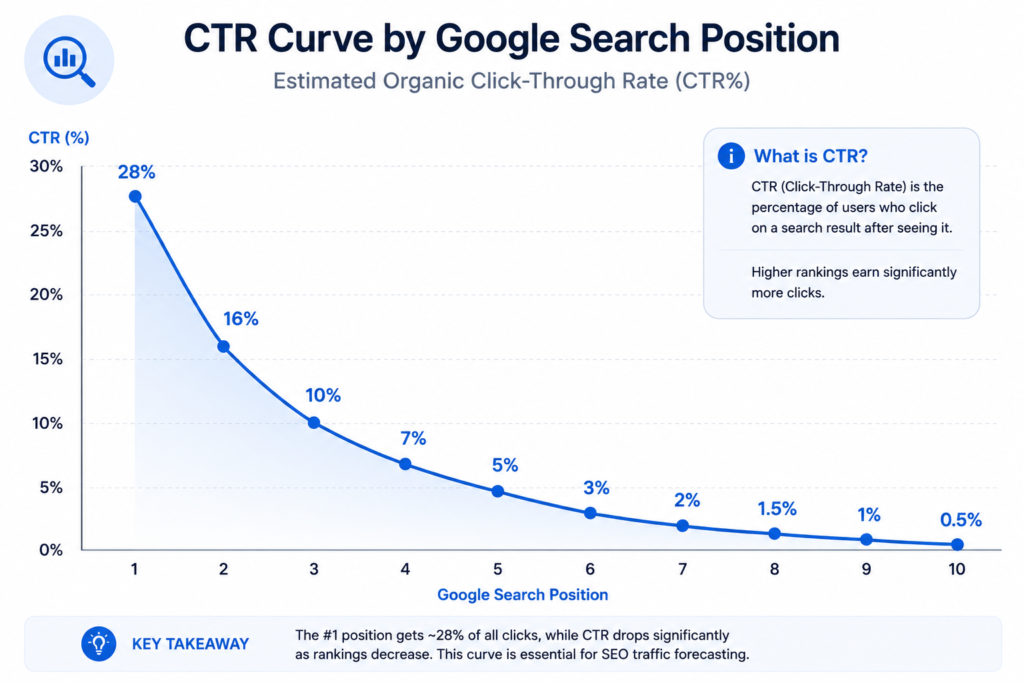
CTR varies by position. A typical curve: position #1 gets ~28% CTR, #2 ~16%, #3 ~10%, and it drops sharply after #5. Advanced Web Ranking publishes a regularly updated CTR study that you can reference (external link provided later).
4. Business metrics
Conversion rate (for e‑commerce) or lead‑to‑customer rate (for SaaS). If you know that 2% of organic visitors buy, you can translate traffic into revenue.
5. Planned SEO activities
List the optimisations you intend to do: new content, link building, technical fixes. Each should have an estimated impact on rankings. For example, “Improve page speed on category pages → expected improvement from #7 to #4.”
4. THE 5‑STEP SEO FORECASTING PROCESS (HOW‑TO)
(This section maps to the HowTo schema.)
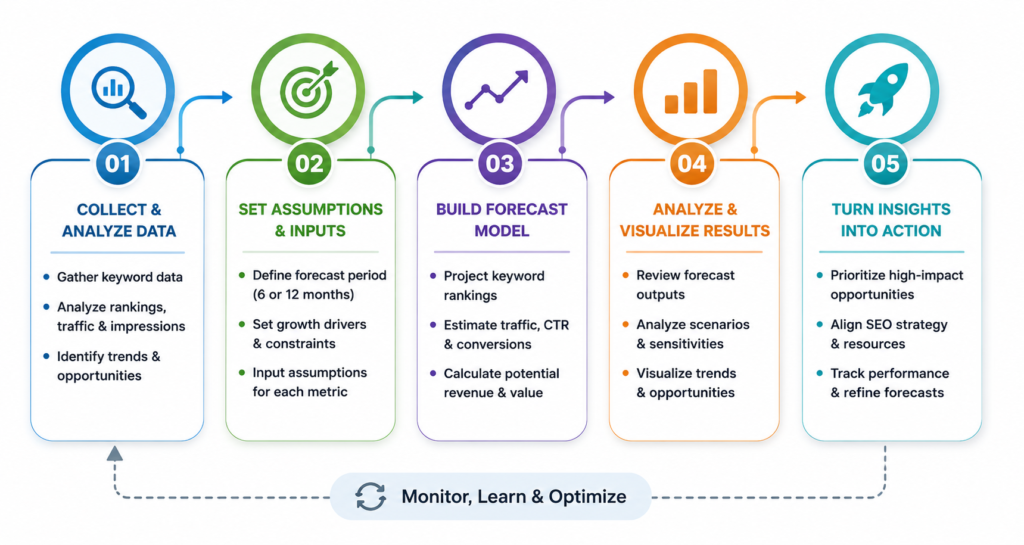
Step 1 – Define your scope and timeframe.
Decide whether you’re forecasting for a single page, a whole site, or a specific product category. Choose a realistic horizon: 6 months for tactical planning, 12 months for strategic. Shorter forecasts are more accurate.
Step 2 – Build your keyword‑level model.
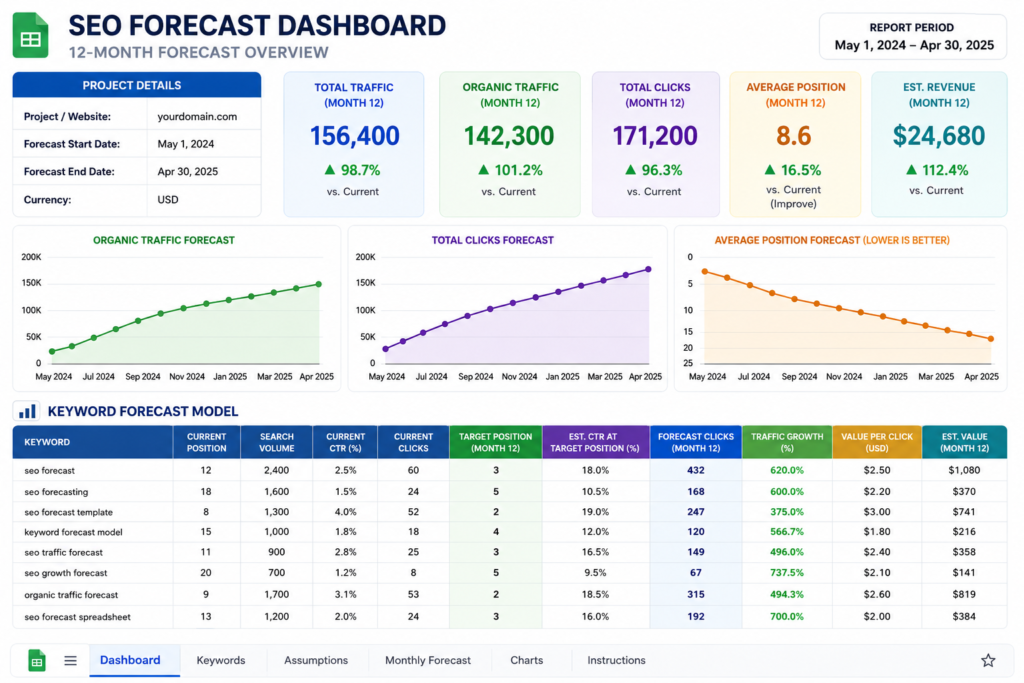
List each target keyword, its current ranking, estimated search volume, and the CTR for that position. Use a simple spreadsheet. For each month, estimate how the ranking will change based on your planned activities, then recalculate traffic:
Traffic = (Search Volume × CTR) for the projected position.
Sum across keywords for total projected organic sessions.
Step 3 – Incorporate historical trends and seasonality.
Use your GSC data to identify seasonal patterns (e.g., an e‑commerce site spikes in November). Apply a monthly multiplier to your keyword‑level forecast to reflect real‑world trends. This grounds your model in actual behaviour.
Step 4 – Create multiple scenarios.
Build a “Best Case,” “Worst Case,” and “Most Likely” version by varying assumptions: ranking velocity, content production speed, algorithm volatility. This prevents over‑promising and helps stakeholders understand the range of possibilities.
Step 5 – Validate and adjust regularly.
After month one, compare actual results with your forecast. If you’re way off, adjust your assumptions – don’t just continue with an inaccurate model. Forecasting is an iterative process, not a one‑time task.
5. FREE VS PAID SEO FORECASTING TOOLS (COMPARISON TABLE)
| Tool | Cost | Key Forecasting Features | Best For |
|---|---|---|---|
| Google Sheets / Excel | Free | Fully customisable, bottom‑up models, scenario planning | Full control, custom templates |
| Ahrefs | Paid ($99+) | Rank Tracker with future projections, traffic potential | Keyword‑level forecasting with historical data |
| Semrush | Paid ($129+) | SEO Forecast tool, traffic projections based on position changes | Quick visual forecasts for client reports |
| SERanking | Paid ($39+) | SEO potential calculator, historical traffic graphs | Mid‑budget, agency‑friendly forecasting |
| Animalz Revive (SEO Forecast) | Free beta | Simple Google Sheets integration, content‑based forecasting | Content‑focused teams, free option |
| Google Looker Studio | Free | Connect GSC data, create live forecasting dashboards | Real‑time trend visualisation |
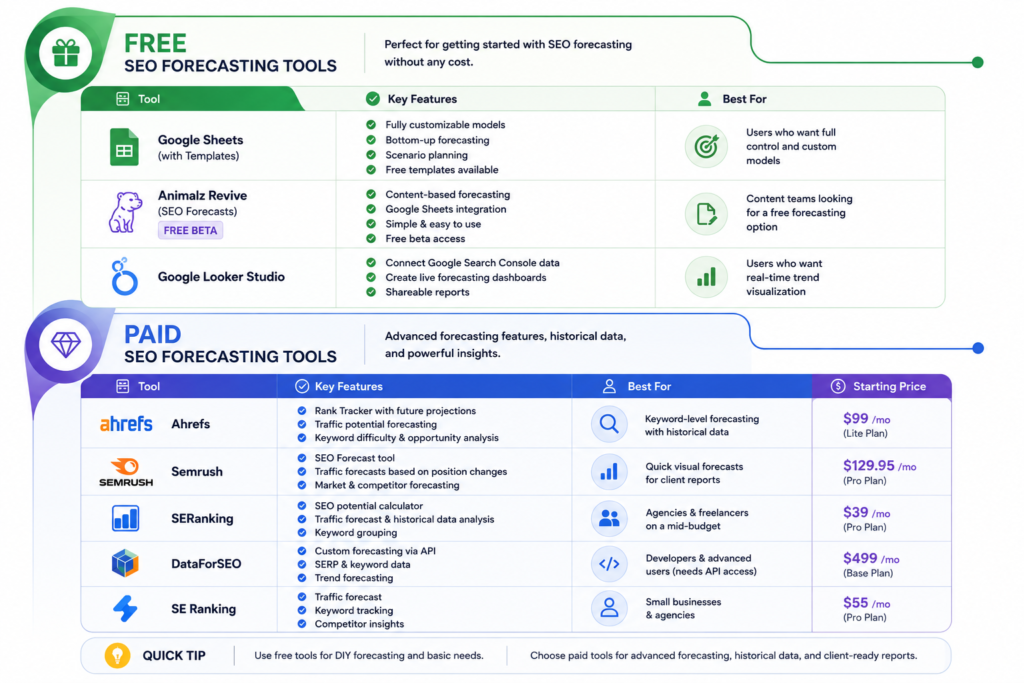
Our recommendation: Start with Google Sheets for complete flexibility. Use Ahrefs or Semrush if you already have a paid subscription and want quick visual outputs. For a free, content‑specific tool, Animalz Revive is promising.
6. BUILDING YOUR OWN SEO FORECAST IN GOOGLE SHEETS (TEMPLATE WALKTHROUGH)
If you prefer full control, here’s a simple Google Sheets structure.
Sheet 1: “Keywords”
Columns: Keyword | Current Position | Target Position | Search Volume | Current CTR | Future CTR | Monthly Traffic (current) | Monthly Traffic (projected).
Use lookup tables for CTR by position.
Sheet 2: “Traffic Timeline”
Columns: Month | Total Projected Traffic (sum of projected traffic from Sheet 1) | Seasonal Multiplier | Final Forecast.
Populate the monthly seasonality multipliers from your GSC historical data.
Sheet 3: “Revenue / Conversions”
If you have conversion data, add a column for projected orders/leads and multiply by average order value.
Sheet 4: “Scenarios”
Duplicate the baseline model and adjust ranking improvements to show Best/Worst cases.
This manual method takes a couple of hours to set up but costs nothing. You can also find ready‑made SEO forecasting templates from various free sources (see external links).
7. FORECASTING FOR DIFFERENT BUSINESS MODELS
E‑commerce
Focus on product category pages and high‑intent keywords (“buy X online”). Use average order value (AOV) and conversion rate from Google Analytics. Seasonality is critical – factor in Black Friday and holiday peaks.
SaaS
Track blog content that drives free trial signups. Map keywords to conversion funnels: organic visit → trial → paid. Use lead‑to‑customer rates, and consider long sales cycles.
Local businesses
Forecast by service area and service type. Use Google Business Profile insights alongside GSC. Rankings in the map pack have different CTR curves than organic links.
In each case, adjust CTR assumptions to match the SERP features present (featured snippets, local pack, AI overviews). If a featured snippet is above the #1 organic result, your organic CTR will be lower.
8. PRESENTING YOUR SEO FORECAST TO CLIENTS & STAKEHOLDERS
A great forecast fails if it can’t be communicated clearly. Follow these tips:
- Start with the bottom‑line number – “We project organic traffic will grow from 10,000 to 25,000 monthly sessions within 12 months.”
- Show the range, not a single point – Display the Best/Worst/Most Likely scenarios. This demonstrates you’ve considered risk.
- Explain assumptions simply – “This assumes we publish 4 articles per month and improve 5 key page speeds.”
- Use visuals – Line charts showing historical traffic and projected growth are far easier to digest than spreadsheets.
- Connect to revenue – “This traffic increase translates to an estimated £150,000 in additional annual revenue.”
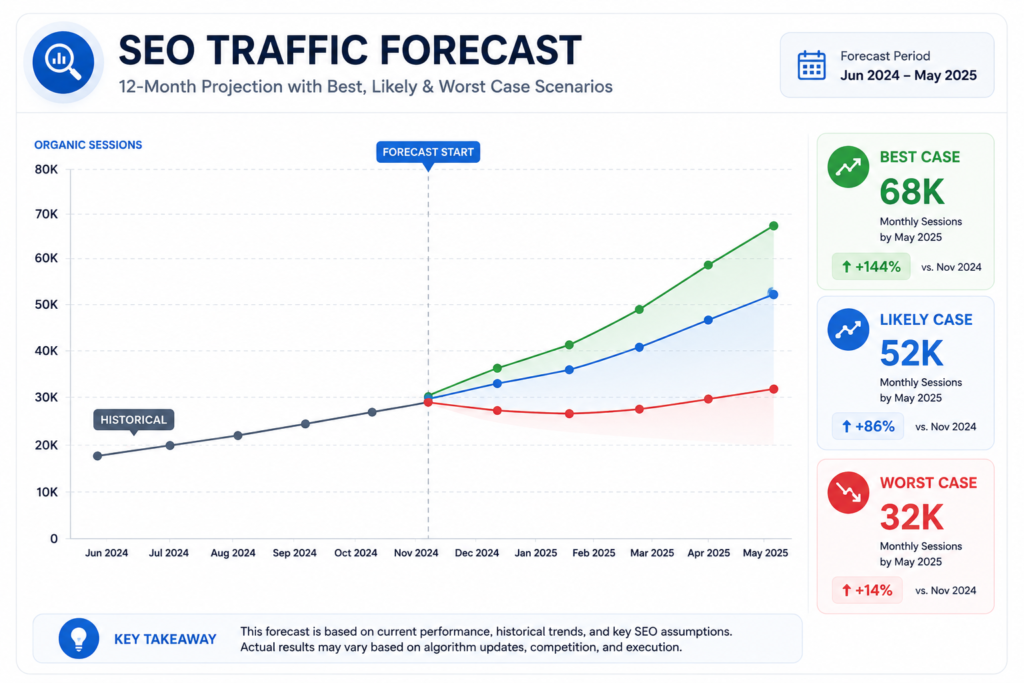
A good presentation turns a spreadsheet into a story. Tools like Canva and Looker Studio can help you create clean charts.
9. COMMON SEO FORECASTING MISTAKES TO AVOID
- Ignoring seasonality – A linear forecast that doesn’t account for December spikes or summer slumps will mislead.
- Over‑estimating CTR – Many beginners assume a #1 ranking means a 50% CTR. Use real CTR studies.
- Forgetting algorithm updates – Leave a buffer for volatility. A 10‑20% margin of error is healthy.
- Not updating the model – A forecast built in January is useless by June if you don’t adjust it with actuals.
- Forecasting rankings, not traffic – Clients don’t care about positions; they care about sessions and sales. Always tie rankings to business outcomes.
10. FREQUENTLY ASKED QUESTIONS
1. What is SEO forecasting?
SEO forecasting is the process of estimating future organic search traffic, rankings, and revenue using historical data, keyword analysis, and planned optimisation activities. It helps set realistic goals and justify SEO investments.
2. How accurate are SEO forecasts?
Accuracy depends on data quality and the forecasting method. Bottom‑up keyword‑level models are typically more reliable than top‑down trend extrapolation, but a margin of error of 10‑20% is common due to algorithm changes and competitor actions.
3. Can I do SEO forecasting for free?
Yes, Google Sheets combined with Google Search Console data and a keyword planner (like Google Keyword Planner) provides everything you need for a basic but effective forecast. Several free forecast templates are also available online.
4. What’s the best SEO forecasting tool?
For full customisation, Google Sheets is the best free option. For paid solutions, Ahrefs and Semrush offer built‑in forecasting modules, while SERanking provides a mid‑budget alternative with a clean interface.
5. How do I account for algorithm updates in my forecast?
Build a scenario model with a “worst case” that assumes a temporary ranking drop. Leave a buffer of 10‑15% in traffic projections, and update your model when a core update rolls out.
6. How often should I update my SEO forecast?
Monthly updates are ideal. Compare actual traffic against your predictions, adjust assumptions, and refresh keyword positions. Quarterly is the minimum acceptable frequency.
7. What data do I need for an SEO forecast?
Historical organic traffic from Google Search Console, current keyword rankings, search volumes, CTR curves, and business metrics like conversion rate and average order value.
8. How do I forecast for a new website with no historical data?
Use keyword research to estimate potential traffic based on target rankings and CTR curves. Look at competitor traffic as a benchmark, and run a conservative “worst case” model until you have real data.
9. Can I forecast revenue from SEO?
Yes, by combining projected traffic with your known conversion rate and average order value or lead value. This creates a direct link between SEO efforts and business outcomes, which is powerful for stakeholder buy‑in.
10. Should I forecast all keywords or only high‑value ones?
Focus on high‑value, high‑volume keywords that drive the majority of your traffic. Forecasting every long‑tail variation is impractical. Prioritise terms that impact business goals.
11. CONCLUSION
SEO forecasting transforms your strategy from a leap of faith into a calculated growth engine. By gathering the right data, building a bottom‑up keyword model (or using a free tool), and scenario‑planning for uncertainty, you can produce forecasts that earn trust and secure investment.
The key takeaway: start simple. Use Google Sheets with Search Console data, apply realistic CTR curves, and update monthly. As your confidence grows, incorporate advanced models and present forecasts with clear visuals and revenue ties.
Bookmark this guide, and revisit it each time you plan a new SEO campaign. For hands‑on help, explore our collection of Free SEO Tools to gather the data your forecast needs.