

1. INTRODUCTION
A 2019 study found that the top organic result in Google gets 31.7% of all clicks, while position two gets only 24.7%. Move to position ten, and you’re scraping less than 3% of clicks. Knowing your google keyword position isn’t just vanity; it’s the difference between a thriving business and a site that nobody visits.
In 2026, Google’s ranking algorithm has evolved to factor in user experience signals, Core Web Vitals, and AI‑generated search snippets. Yet the foundational question remains the same: “Where does my site rank for my target keywords?”
In this guide, you’ll learn:
- What keyword position really means (and what it doesn’t).
- How to check your Google keyword position using free tools — no credit card required.
- A step‑by‑step audit process to track rankings across devices and locations.
- How to interpret position changes and turn them into actionable SEO improvements.
- Common mistakes that make your rank tracking data useless.
Whether you’re a business owner watching your main keyword or an SEO agency managing hundreds of terms, this is your definitive, 2026‑ready resource.
2. WHAT IS KEYWORD POSITION AND WHY IT MATTERS IN 2026
Keyword position is simply the spot your webpage occupies on a search engine results page (SERP) when a user types a specific query. Position #1 is at the very top; position #11 is on the second page. But in 2026, the SERP isn’t a simple list — featured snippets, “People also ask,” image packs, and AI overviews all push traditional organic links further down. So your “position” might be #4 on the page, but you could still be the third organic link after a snippet and an ad.
Why does it matter?
- Traffic is directly tied to rank. The first organic result still captures the lion’s share of clicks.
- It measures your SEO health. If your position for a core keyword drops, something changed — perhaps a competitor out-optimized you or an algorithm update affected your page.
- It guides your strategy. Knowing you’re stuck on page two tells you to invest more in content and backlinks; knowing you’re #4 means a nudge could get you onto the first screen.
A google keyword position checker automates this monitoring so you’re not manually typing queries into an incognito window a hundred times a day.
3. HOW GOOGLE CALCULATES KEYWORD POSITION (ORGANIC VS. UNIVERSAL)
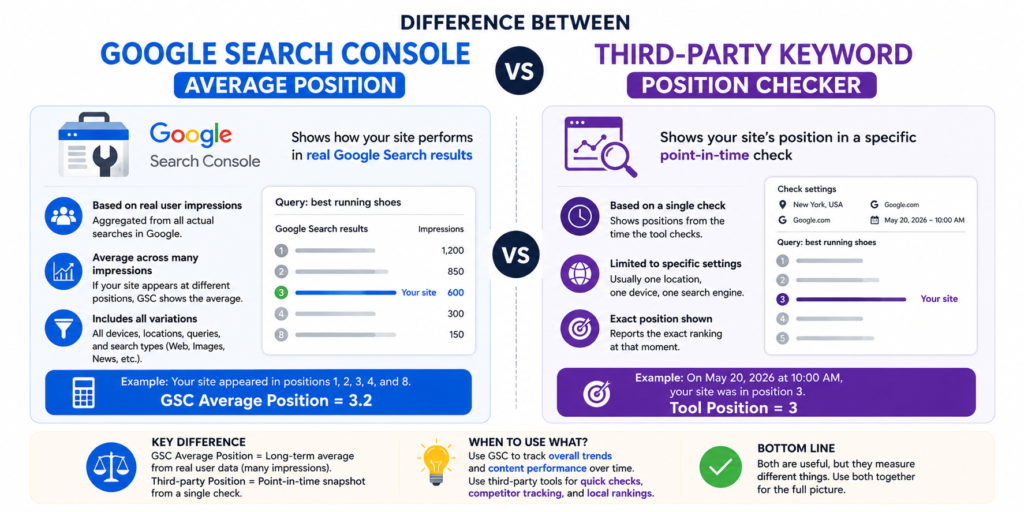
Google’s own measurement appears in Google Search Console under “Average position.” This is calculated as the mean ranking of your page across all searches for that query, rounded mathematically. It’s useful but can be misleading. For example, if your page appears at position #2 for one user and position #8 for another, the average is #5 — which doesn’t reflect any actual experience.
Third‑party rank trackers, like SmallSEOTools or Ahrefs, usually scrape the live SERP from a specific location and device. They give you the exact position at that moment, which is more reflective of what a real user sees.
In 2026, the SERP is highly personalized: positions can shift based on the searcher’s location, device, search history, and even time of day. So any single number is a snapshot, not an absolute truth.
Key takeaway: Use Search Console for high‑level trends. Use a dedicated google keyword position checker tool for precise, localized snapshots.
4. THE BEST FREE KEYWORD POSITION CHECKER TOOLS (COMPARED)
You don’t need to pay to get started. Here’s a quick comparison of the top free tools:
| Tool | Number of Keywords (Free) | Location Targeting | Device Support | Automation | Extra Features |
|---|---|---|---|---|---|
| Google Search Console | Unlimited (all queries you rank for) | Country only | No separate mobile/desktop filter, but you can add a device dimension | Auto‑updated daily | Completely free, based on real user data |
| SmallSEOTools Keyword Position Checker | Up to 10 keywords at a time | Allows country selection (Google domain) | Yes (choose user agent) | Manual | Simple, no login needed |
| W3era Keyword Position Checker | Bulk up to 20 keywords | Yes, country and city | Yes (desktop/mobile) | Manual | Also shows search volume |
| Ahrefs Keyword Rank Checker | 10 queries per day (guest access) | Only Google.com by default (requires login for custom) | No | Manual but fast | Shows URL ranking for each keyword |
| Google Trends | Not a rank checker, but shows interest over time | Country‑specific | Not applicable | No | Complements rank tracking by revealing seasonality |
Our recommendation for beginners: Start with Google Search Console for overall trends and SmallSEOTools for spot‑checks. For agencies or frequent monitoring, a paid tool like Ahrefs or SEMrush is worth the investment.
5. HOW TO CHECK YOUR KEYWORD POSITION: A 7-STEP AUDIT
(This section is structured for the HowTo schema.)
Step 1 – Decide on your target keywords and context.
Choose up to 10 keywords you want to track. Note which Google domain you want to check (google.com, google.co.uk, etc.) and whether you care about desktop or mobile results.
Step 2 – Use Google Search Console for baseline average position.
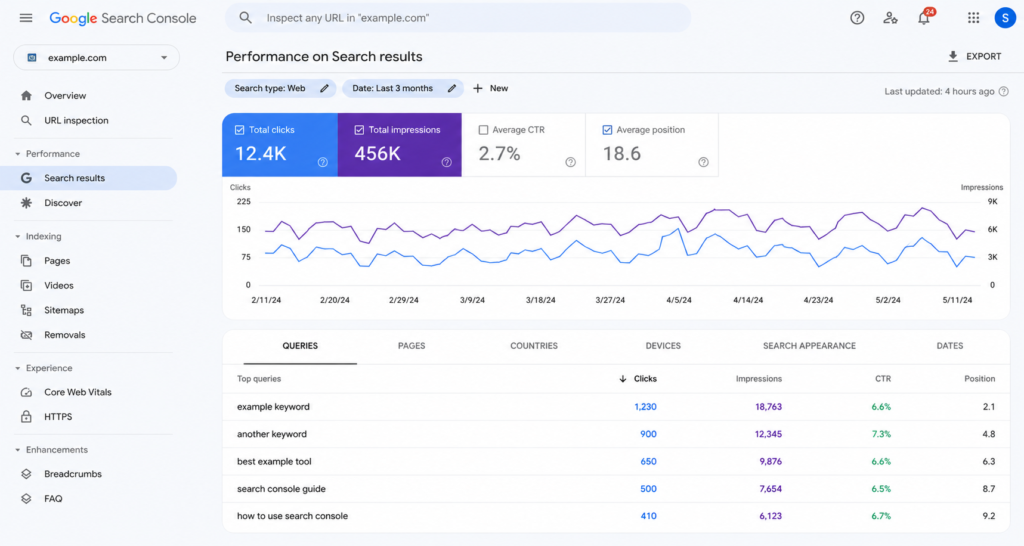
Navigate to Performance → Queries. Find your keyword in the list. The “Average position” column shows how your page has been performing over the selected date range. This is based on real user searches, not a simulated scrape.
Step 3 – Perform a manual SERP check using a free tool.
Go to SmallSEOTools Keyword Position Checker. Enter your domain, select the Google domain and device, and input your keyword. The tool returns the exact position of your URL (or tells you it’s not in the top 100). Repeat for each keyword.
Step 4 – Bulk‑check multiple keywords for efficiency.
If you have more than five keywords, use a tool like W3era or Ahrefs Rank Checker that supports bulk upload. Copy and paste your list and get results in one go. This saves you from doing 20 individual lookups.
Step 5 – Document positions with context.
Always note the date, time, device, and location when you record a position. Without these, two “position #5” readings might be from different contexts and could mislead you into thinking a ranking dropped.
Step 6 – Set up automated tracking (if possible).
Most paid SEO platforms (Ahrefs, SEMrush, SERanking) allow you to schedule weekly rank checks and email you reports. Even if you’re on a tight budget, some tools like SerpRobot offer affordable automated checking. This eliminates manual labor and gives you a clean history.
Step 7 – Interpret the data and act.
A one‑time position check tells you where you are, but not why. Cross‑reference position changes with any site updates you made, algorithm changes, or new competitors entering the market. Prioritize keywords that are on page two (positions 11–20) — they are easiest to push onto page one with content improvements or link building.

6. UNDERSTANDING AND ACTING ON YOUR KEYWORD POSITION REPORT
A raw “position #7” is meaningless without context. Here’s how to turn numbers into actions:
- If you’re in the top 3: Your click‑through rate (CTR) is likely strong, but you could still improve. Optimize your title and meta description to boost CTR further.
- Positions 4–10: You’re on page one, but not yet the first thing users see. Build internal links to that page, add rich snippets (FAQ, HowTo schema), and improve content quality to climb higher.
- Positions 11–20 (page two): You’re close. Often a minor update — adding current stats, expanding the article, or earning a few quality backlinks — can push you onto page one.
- Positions 21+: This page needs significant work. You may be targeting the wrong keyword, facing stiff competition, or the content may be shallow. Consider a complete rewrite or stronger differentiation.
Critical nuance: In 2026, a “position #1” might be a featured snippet, an image pack, or an AI overview. Your page might be the first traditional organic result, but visually it’s below those elements. Use a rank tracker that can distinguish organic links from SERP features so you know if that #1 spot is actually the #1 click.
7. TRACKING KEYWORD POSITIONS OVER TIME (WITHOUT GOING CRAZY)
Rankings aren’t static; they dance up and down daily. Obsessing over every fluctuation leads to bad decisions. Instead:
- Set a weekly check for important keywords. Monthly for less critical ones.
- Use a rolling average rather than a single point. If your average position over 30 days is 5.2 and today’s spot check says 8, don’t panic — wait for the trend to confirm.
- Create a simple spreadsheet with columns: date, keyword, tool used, device, location, position, URL. Over time, you’ll have a reliable history.
- Watch for algorithm updates. When Google rolls out a core update, expect volatility. Wait a week before making changes.
Remember: one keyword moving from #5 to #11 on a Tuesday might just be Google testing. Real ranking declines last more than a couple of days and across multiple terms.
8. COMMON MISTAKES WHEN CHECKING KEYWORD POSITIONS (AND HOW TO FIX THEM)
- Checking only one keyword per page. Most pages rank for dozens of queries. Use Search Console to see the full list and identify which ones actually drive traffic.
- Ignoring location and device. If you’re a local business, rank #3 in the map pack but #7 in organic is more valuable. Always simulate local searches.
- Using the wrong tool for the job. A manual checker is fine for 5 keywords; for 500, you need automated bulk tracking or you’ll burn hours.
- Treating “average position” as gospel. Remember, an average of 3 could mean you’re #1 half the time and #5 half the time. Investigate outliers.
- Neglecting SERP features. If a featured snippet, image pack, or video carousel sits above the #1 organic result, your “position #1” might still be invisible. Use tools that show SERP feature presence.
- Checking from a personalized account. Always use incognito/private mode or a tool that simulates a clean browser to avoid bias.
9. COMPARISON TABLE: FREE VS. PAID KEYWORD POSITION CHECKERS
| Feature | Free Tools (GSC, SmallSEOTools) | Paid Tools (Ahrefs, SEMrush, SERanking) |
|---|---|---|
| Cost | $0 | 29–199/month |
| Number of keywords tracked | Limited (10–unlimited in GSC but only your own data) | Up to thousands, with scheduled tracking |
| Historical data | GSC holds 16 months; others only snapshot | Full history from the day you start tracking |
| Location/device targeting | Basic country, limited device options | City‑level, exact GPS, specific user‑agent |
| Competitor tracking | Not possible | Track any domain, see competitor movements |
| SERP feature detection | Limited (GSC shows rich result types) | Detailed (featured snippet, knowledge panel, etc.) |
| Reporting & alerts | Manual export | Automated email reports, API access |
Advice: Start free. Once you outgrow the limits (or need competitor data), invest in a paid rank tracker.
10. FREQUENTLY ASKED QUESTIONS
1. What is a keyword position in Google?
A keyword position is the numerical spot your website occupies on the Google search results page for a specific query. Position #1 is at the top, #2 below it, and so on. It indicates how visible your page is to users searching that term.
2. How can I check my keyword ranking for free?
Use Google Search Console’s Performance report for your own site’s average position, or try free online tools like SmallSEOTools Keyword Position Checker or the Ahrefs free rank checker. Simply enter your domain and keyword, and the tool will tell you the current position.
3. Does Google have a built‑in keyword position checker?
Yes, Google Search Console provides an “Average position” metric for all queries your site appears for. However, it doesn’t offer real‑time, manual spot‑checking for any keyword you want — for that you need a third‑party rank tracker.
4. What is a good keyword position?
Positions #1–3 are excellent and capture the majority of clicks. Positions #4–10 are still valuable (page one). Anything beyond position #10 (page two or deeper) typically gets very little traffic and should be targeted for improvement.
5. How often should I check my keyword positions?
Weekly checks are sufficient for most websites. Daily monitoring is only necessary for highly competitive, high‑value keywords or immediately after a site change. Monthly tracking is fine for long‑tail, low‑volume terms.
6. Why did my keyword position drop suddenly?
Common causes include a recent Google algorithm update, a competitor publishing a better page, technical SEO issues (e.g., page not crawlable), or a drop in backlink quality. Check Google Search Console for manual actions and review your page’s content freshness.
7. Can I track keyword positions for YouTube or Bing?
Yes, most rank trackers support multiple search engines. SmallSEOTools and Ahrefs allow you to select YouTube or Bing as the search engine, and Google Trends can show YouTube search interest over time.
8. Is mobile keyword ranking different from desktop?
Absolutely. Google uses mobile‑first indexing, and mobile SERPs often have different features and layouts. Rankings can differ because Google considers mobile‑friendliness and site speed. Always check mobile positions separately, especially if your audience is smartphone‑heavy.
9. What’s the difference between “average position” and “actual position”?
Average position (from Search Console) is the mean of all your rankings for that query across many searches. Actual position is what a rank tracker scrapes at a specific moment for a specific user context. Actual position is more precise for a given scenario, but average shows the trend.
10. How do I track local keyword positions (map pack)?
Use a rank tracker that supports local tracking by entering a city name or GPS coordinates. SmallSEOTools and W3era let you choose a location. For Google My Business insights, also monitor Google Business Profile performance separately.
11. CONCLUSION
Knowing your google keyword position is the most direct feedback loop in SEO. It tells you if your efforts are paying off, which pages need attention, and where your competitors stand. With the mix of free tools like Google Search Console and third‑party rank checkers, you can build a solid, no‑cost monitoring system.
The 7‑step audit we walked through — from setting context, using Search Console, to documenting and interpreting data — gives you a repeatable process. Remember, a single number doesn’t tell the whole story: always consider device, location, and SERP features.
Bookmark this guide and run a position audit every month. Small improvements compound over time, and the only way to know you’re climbing is to measure. For a more automated approach, try our Free SEO Tools to streamline your rank tracking and reporting.