


1. INTRODUCTION
68% of online experiences begin with a search engine, and the words people type are the bridge between your content and your audience. Yet too many website owners skip the most crucial step: they write about what they think people want, not what they actually search for. That’s where how to do keyword research for SEO becomes your superpower.
Keyword research is the systematic process of discovering the exact words and phrases your potential customers type into Google. Done right, it tells you what topics to cover, how to prioritise your content, and exactly which terms can drive traffic that converts.
In this 2026 guide, you’ll learn:
- A 5‑step keyword research process that works for any niche.
- How to use free tools (Google Keyword Planner, Ubersuggest, and even Google itself) to build a massive keyword list.
- The difference between search intent types and how to match them to your content.
- How to spy on your competitors’ keywords ethically.
- How to organise your keywords into content clusters that Google loves.
Whether you’re launching a new blog, optimising a service page, or planning a full content strategy, this guide will give you a repeatable, data‑driven workflow. Let’s dig in.
2. WHAT IS KEYWORD RESEARCH AND WHY IT’S THE FOUNDATION OF SEO
Keyword research is the act of identifying, analysing, and prioritising the search terms that real people use. It’s not about guessing; it’s about using tools and data to understand the language of your market.
Why does it matter?
- It connects you with your audience. If you don’t target the words they actually search, your content remains invisible.
- It prevents wasted effort. Why write a 3,000‑word guide on a topic nobody searches for? Keyword data validates demand.
- It drives the right traffic. Not all visitors are equal. A keyword can bring window‑shoppers or ready‑to‑buy users, depending on its search intent.
Google itself emphasises that content should be created for people, not just algorithms. Keyword research ensures you’re answering the real questions your audience is asking.
3. THE 5‑STEP KEYWORD RESEARCH PROCESS (OVERVIEW)
Before we dive into the details, here’s a bird’s‑eye view of the workflow you’ll follow. Each step will get its own section with actionable instructions.
- Start with seed keywords – words that describe your business or topic at the broadest level.
- Expand your list – use Google’s own features (autocomplete, “People Also Ask”, related searches) and free tools to generate hundreds of variations.
- Analyse intent, volume, and difficulty – separate informational queries from transactional ones, check monthly search volume, and estimate how hard it will be to rank.
- Spy on competitors – see which keywords are already sending traffic to your rivals and borrow the ones you can realistically target.
- Organise into content clusters – group related keywords around a central “pillar” topic to build topical authority.
By the end, you’ll have a prioritised list of keywords and a clear content plan.
4. STEP 1: START WITH SEED KEYWORDS AND ANALYSE YOUR NICHE
Seed keywords are the obvious, top‑of‑mind terms that describe your product, service, or topic. If you sell handmade soap, your seeds might be “natural soap,” “handmade soap,” and “organic skincare.” They are the starting point, not the final list.
To find them, ask yourself three questions:
- What do I sell / offer?
- What problem does it solve?
- What words would a complete beginner use to search for it?
Then, do a quick Google search for each seed term. Look at the autocomplete suggestions that drop down as you type. Note them down. These are variations that real people are already searching for. Also scroll to the bottom of the search results page: the “Related searches” section is another goldmine.
Finally, visit Google Trends to see if your seed topic is rising or falling in popularity over time. This can save you from targeting a dying fad.
5. STEP 2: EXPAND YOUR LIST USING FREE TOOLS & GOOGLE FEATURES
Now that you have a handful of seed keywords, it’s time to explode them into a long list of specific terms. You don’t need a paid subscription for this phase.
A. Google’s “People Also Ask” (PAA) and “Related Searches”
For any seed keyword, look at the PAA boxes and the eight related searches at the bottom of the SERP. Click through the questions to expand them—each click generates new questions. This one feature alone can give you dozens of long‑tail keyword ideas.
B. Google Keyword Planner
Originally an ads tool, Google Keyword Planner remains one of the most accurate sources of search volume data. Enter a seed keyword, and it returns monthly searches, competition level, and related keyword ideas. Even if you don’t run ads, the data is invaluable.
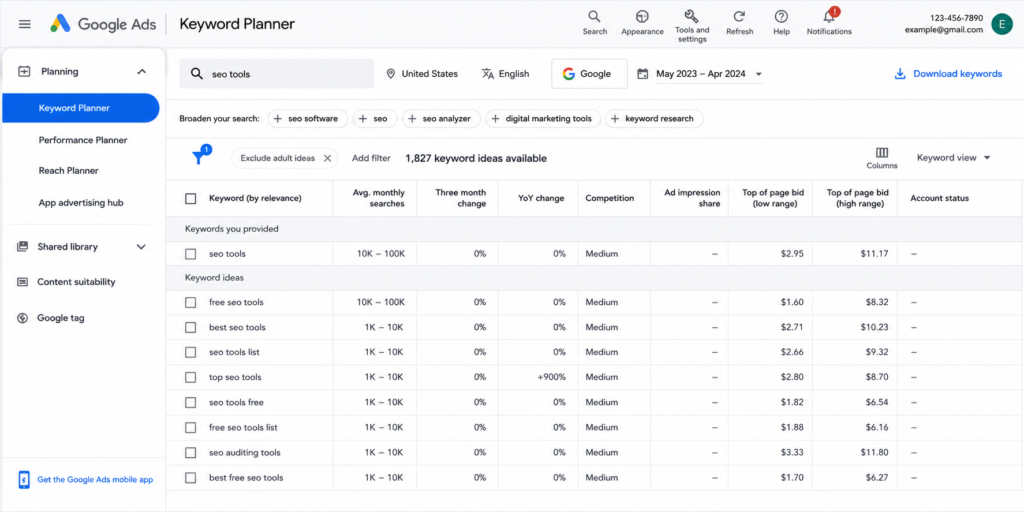
C. Free‑mium tools like Ubersuggest
Ubersuggest offers a generous free tier. Enter a domain or keyword, and it generates hundreds of suggestions along with estimated volume and SEO difficulty. It’s excellent for quick, bulk idea generation.
D. AnswerThePublic
This visual tool scrapes Google autocomplete and displays questions, prepositions, and comparisons in a radial map. It’s perfect for discovering the exact phrases people use when they’re asking questions.
By the end of this step, you should have anywhere from 100 to 500 raw keywords.
6. STEP 3: ANALYSE SEARCH INTENT, VOLUME, AND DIFFICULTY
A long list is useless if you don’t filter and prioritise. Each keyword falls into one of four search intent categories:
- Informational – the user wants to learn something (“how to do keyword research”). Best for blog posts and guides.
- Commercial – the user is researching before buying (“best keyword research tools”). Great for comparison articles.
- Transactional – the user is ready to buy (“buy Ahrefs subscription”). Perfect for product pages.
- Navigational – the user wants a specific brand or site (“Ahrefs login”). Usually not targetable unless it’s your brand.
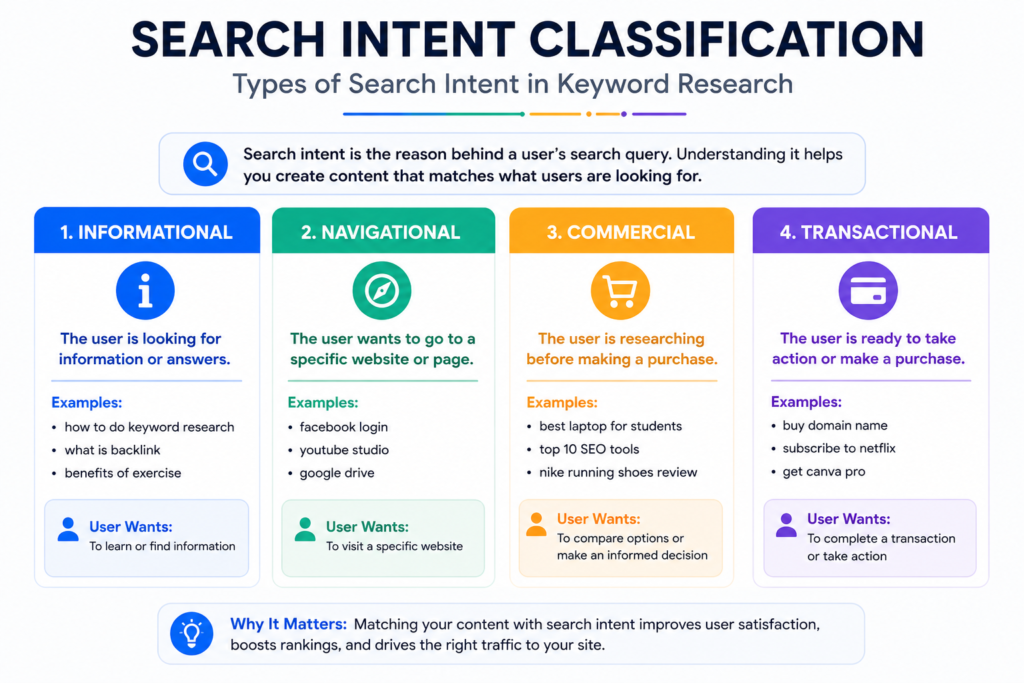
Once you’ve labelled the intent, check search volume. A keyword that gets 1,000 searches a month is generally more attractive than one with 10. But don’t ignore low‑volume terms—they often have less competition and higher conversion potential.
Next, estimate keyword difficulty. Free tools like Ubersuggest give a rough score; you can also manually check the top 10 results. If the first page is full of high‑authority domains, it’ll be harder to crack. In 2026, Google also looks at the overall topical authority of your site, so clustering related content (Step 5) helps even with moderately competitive terms.
7. STEP 4: SPY ON COMPETITORS’ KEYWORDS (ETHICALLY)
Your competitors have already done part of the work for you. By analysing which keywords are sending them traffic, you can find proven opportunities.
How to do it with free tools:
- Ubersuggest’s “Top Pages” feature – enter a competitor’s domain, and it lists their best‑performing pages and the keywords they rank for.
- Google Search Console – if you already have a site, the “Performance” report shows which queries you appear for. Find keywords where you rank on page two (positions 11‑20); those are low‑hanging fruit.
- Manual SERP analysis – search your target keyword and note the domains ranking on page one. Visit those pages and check what other subtopics they cover. This often reveals related keywords you can tackle.
Important: Don’t copy a competitor’s entire keyword list blindly. Use it as inspiration to fill gaps in your own coverage. The goal is to find terms where you can create better content, not duplicate what exists.
For a more in‑depth approach, paid tools like Ahrefs and Semrush offer comprehensive competitor keyword analysis. Their guides (linked) also explain the methodology in detail.
8. STEP 5: ORGANISE KEYWORDS INTO CONTENT CLUSTERS AND PLAN YOUR CONTENT
The final step is turning your filtered keyword list into a logical content structure. Google now rewards topical authority—having multiple interlinked pages covering a subject deeply rather than one isolated article.
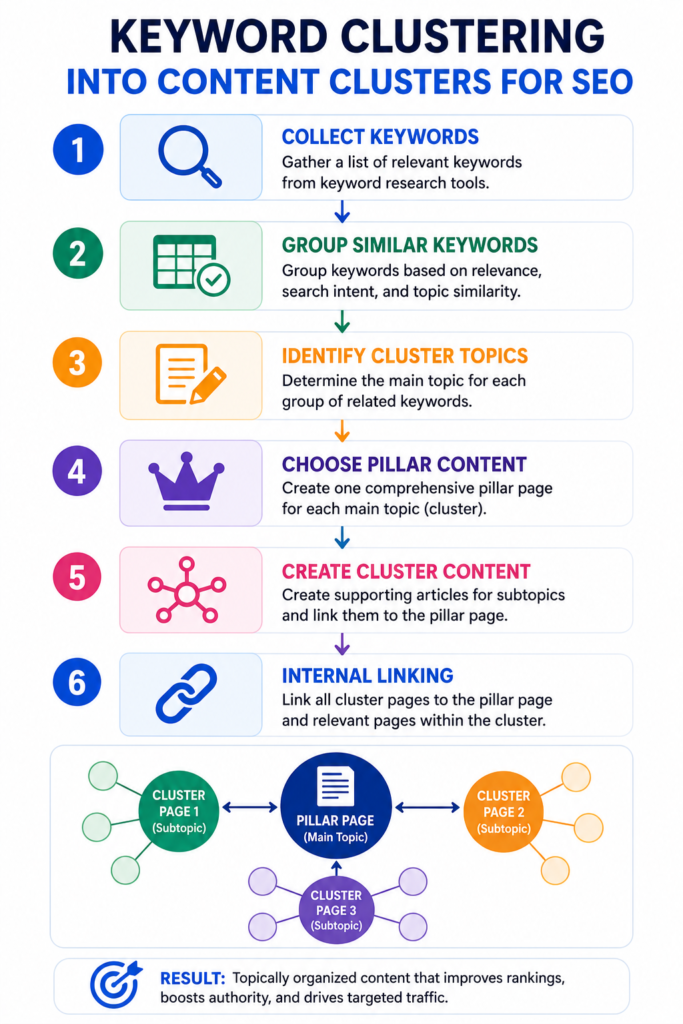
How to build content clusters:
- Pick a broad, high‑volume pillar topic (e.g., “Keyword Research”).
- Create a comprehensive pillar page that covers the topic at a high level.
- Under that pillar, assign cluster pages targeting more specific keywords from your list (e.g., “how to use Google Keyword Planner,” “long‑tail keyword strategies,” “competitor keyword analysis”).
- Link each cluster page back to the pillar and to each other where relevant.
This internal linking structure helps search engines understand the relationship between your pages and spreads authority throughout the cluster.
Finally, map the keywords to your content calendar. Prioritise low‑difficulty, high‑intent keywords first, and intersperse informational topics to build authority gradually.
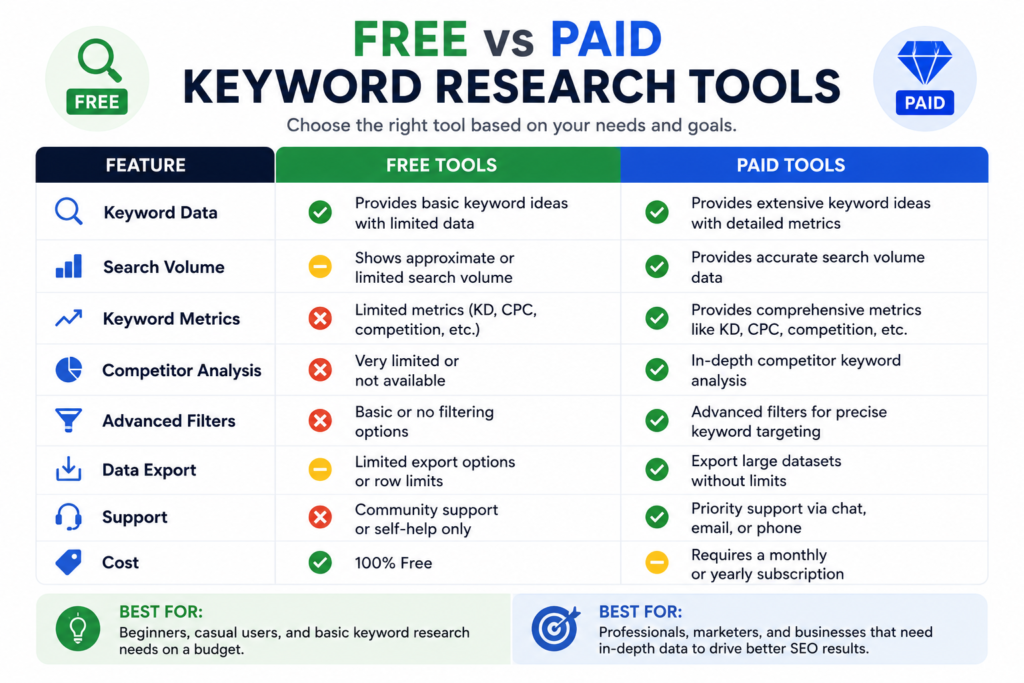
9. FREE KEYWORD RESEARCH TOOLS COMPARISON TABLE
| Tool | Free Plan Limits | Key Features | Best For |
|---|---|---|---|
| Google Keyword Planner | Unlimited, but requires an Ads account | Search volume, competition level, related keywords | Accurate volume data |
| Ubersuggest | 3 searches/day (free) | Keyword suggestions, difficulty score, top pages | Quick idea generation |
| AnswerThePublic | 3 searches/day (free) | Visual question map, prepositions, comparisons | Finding question‑based keywords |
| Google Trends | Unlimited | Interest over time, regional popularity, related topics | Identifying trends |
| Google “People Also Ask” | Unlimited | Real‑time question expansion, no tool required | Long‑tail question discovery |
| Ahrefs (paid) | No free access | Keyword explorer, competitor analysis, content gap | Advanced competitor research |
| Semrush (paid) | 10 requests/day (free trial) | Keyword magic tool, intent metrics, clustering | Full‑featured enterprise research |
10. FREQUENTLY ASKED QUESTIONS
1. What is keyword research in SEO?
Keyword research is the process of finding, analysing, and selecting the search terms that people enter into search engines. It helps you understand what your audience is looking for and guides your content creation to match their needs.
2. How can I do keyword research for free?
You can start with Google’s own tools: autocomplete, “People Also Ask,” and related searches. Then, use Google Keyword Planner for volume data and Ubersuggest’s free tier to generate keyword ideas. These require no paid subscription.
3. What are the best free keyword research tools?
Google Keyword Planner, Ubersuggest, AnswerThePublic, and Google Trends are among the most reliable free tools. They provide search volume, keyword suggestions, and trend data without cost.
4. How do I find long‑tail keywords?
Long‑tail keywords appear naturally when you use question‑based searches, browse “People Also Ask,” or type partial phrases into Google autocomplete. Tools like AnswerThePublic also specialise in generating long‑tail questions.
5. What is search intent and why does it matter?
Search intent is the goal behind a user’s query — informational, commercial, transactional, or navigational. Matching your content to the correct intent is essential because Google ranks pages that best satisfy what the user really wants.
6. How do I use Google Keyword Planner for SEO?
Log into your Google Ads account, open Keyword Planner, and choose “Discover new keywords.” Enter a seed term, and the tool returns monthly searches, competition, and related keywords. Even without running ads, you can export this data for SEO planning.
7. What is keyword difficulty?
Keyword difficulty is an estimate of how hard it is to rank for a term, based on the authority of the pages currently in the top results. Most tools score it from 0 to 100; a lower score indicates easier ranking opportunities.
8. How many keywords should I target per page?
Target one primary keyword per page, and include a few closely related secondary keywords naturally in the content. This keeps the page focused while still covering the topic comprehensively.
9. How do I find out what keywords my competitors are using?
Use tools like Ubersuggest or Ahrefs to enter a competitor’s domain and see their top keywords. Google Search Console can also show which queries your own site already ranks for, revealing competitor overlap.
10. What are LSI keywords and do they still matter in 2026?
LSI (Latent Semantic Indexing) keywords are terms conceptually related to your main keyword. While Google no longer relies on the old LSI technology, using naturally related words and synonyms still helps search engines understand your content’s depth and relevance.
11. CONCLUSION
How to do keyword research for SEO isn’t a one‑time task—it’s an ongoing strategic habit. By following the five‑step process outlined here (seed keywords → expansion → analysis → competitor research → clustering), you turn guesswork into a data‑driven content machine.
Remember to leverage the free tools at your disposal: Google Keyword Planner for volume, Ubersuggest for ideas, and Google’s own SERP features for real‑time user language. Always filter by search intent, and organise your findings into clusters that build lasting topical authority.
Bookmark this guide and revisit it whenever you plan a new piece of content. For ongoing keyword tracking, try our Free Keyword Position Checker to see how your rankings improve over time. used to. Focus on “Topical Authority” and writing naturally for humans rather than hitting a specific percentage of keyword repeats.
