


1. INTRODUCTION
Every time you visit a website, your browser sends a string of plain text that gets encoded into numbers behind the scenes. One of the most fundamental encodings is hexadecimal — a base‑16 number system that turns every character you type into a two‑symbol code. If you’ve ever needed to debug data, embed a hidden message, or interface with hardware, you’ve likely asked: “How do I convert text to hex?”
The good news? In 2026 you don’t need to memorise a conversion table. Free online text to hexadecimal converters do the work instantly, and we’ll show you exactly how to use them — and more importantly, how the magic happens under the hood.
By the end of this guide you’ll know:
- What text to hexadecimal conversion really means.
- How to pick the best free online converter (and avoid the ad‑filled ones).
- A step‑by‑step method to convert any text to hex, manually or automatically.
- Real‑world applications where hex encoding is essential.
- A ready‑to‑use JavaScript snippet you can paste into your own browser console.
Let’s turn “Hello, world” into 48 65 6c 6c 6f 2c 20 77 6f 72 6c 64 21.
2. WHAT IS TEXT TO HEXADECIMAL? (AND WHY IT MATTERS)
Every letter, digit, and punctuation mark on your screen is stored inside a computer as a number. The most common mapping is ASCII (American Standard Code for Information Interchange). For example, the uppercase letter A is stored as the decimal number 65. Hexadecimal is simply a more compact way to write that number using 16 symbols: 0‑9 and A‑F.
So A → decimal 65 → hexadecimal 41. A text to hexadecimal converter automates this mapping for an entire string of characters, producing a long string of hex pairs like 41 20 53 74 61 72.
Why is this useful?
- Data representation – hex is easier to read than binary. The byte
01000001becomes41. - Debugging & forensics – raw data dumps are almost always shown in hex.
- Web development – colour codes (e.g.,
#FF5733) are hexadecimal. - Cryptography – wallet addresses and hashes use hex.
- Hardware/embedded systems – many microcontrollers accept data in hex format.
Hexadecimal is not a secret code — it’s just a human‑friendly lens for viewing raw bytes.
3. HOW TEXT TO HEXADECIMAL CONVERSION WORKS (ASCII, UNICODE, AND THE MATH)
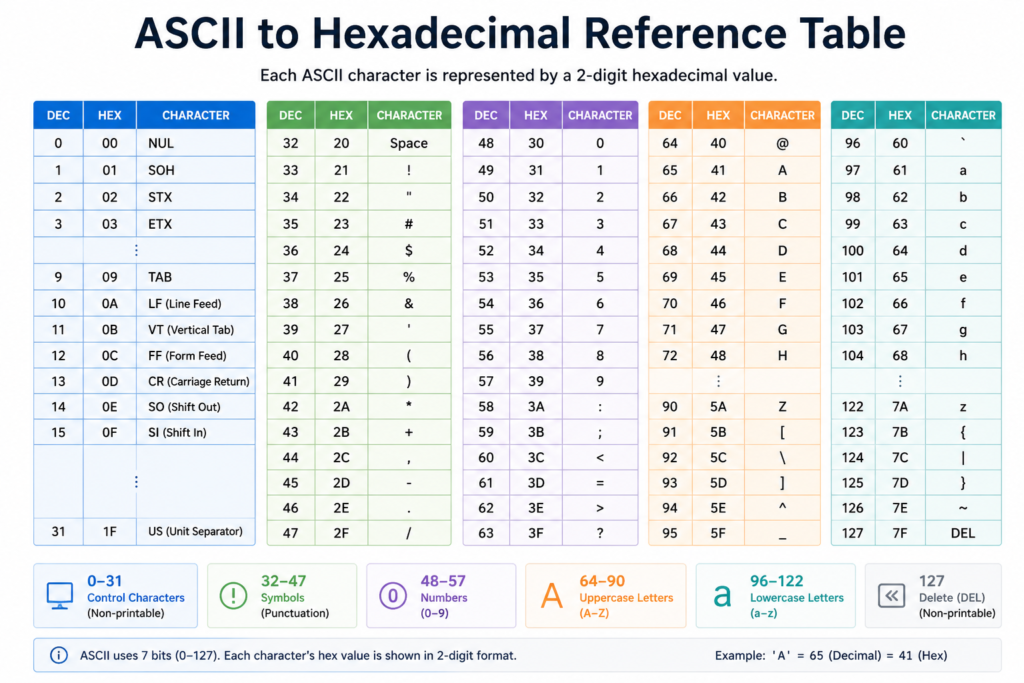
The most basic conversion relies on the ASCII table. Each character is assigned a decimal number; that number is then converted to base‑16. For example:
a→ 97 → hex61B→ 66 → hex42!→ 33 → hex21
To convert a whole text, the process loops through each character, looks up its code, and writes the hex equivalent.
For Unicode characters (like emojis or non‑Latin scripts), the number may be much larger and encoded with UTF‑8. Some online converters handle only ASCII; advanced tools handle full UTF‑8.
ASCII to Hex Quick Reference Table
| Character | Decimal | Hexadecimal |
|---|---|---|
| A | 65 | 41 |
| B | 66 | 42 |
| Z | 90 | 5A |
| a | 97 | 61 |
| z | 122 | 7A |
| 0 | 48 | 30 |
| 9 | 57 | 39 |
| Space | 32 | 20 |
| ! | 33 | 21 |
| @ | 64 | 40 |
The conversion between decimal and hex follows simple division: divide the decimal by 16, the quotient is the first hex digit, the remainder is the second. So 65 ÷ 16 = 4 (first digit), remainder 1 (second digit) → 41.
4. TOP FREE ONLINE TEXT TO HEX CONVERTERS (COMPARED)
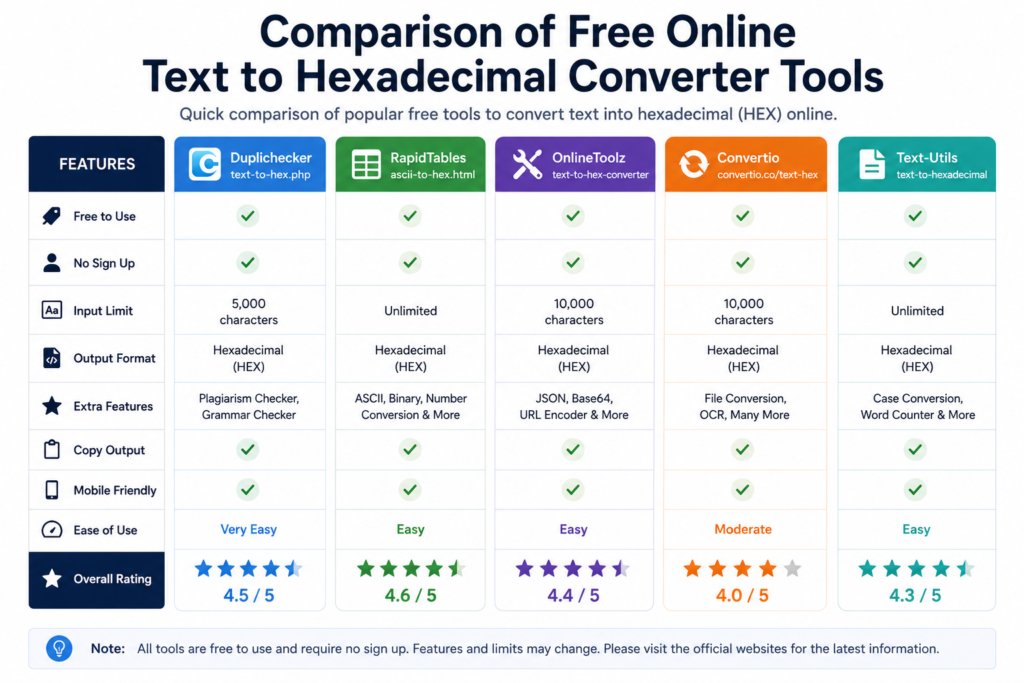
We tested four reputable, no‑login‑required tools. Here’s how they stack up.
| Tool | Max Input Size | Supports Unicode | Ad‑free | Extra Features |
|---|---|---|---|---|
| Duplichecker | 5000 characters | Yes (UTF‑8) | Yes (clean interface) | Hex to text, binary, decimal, octal |
| RapidTables | Unlimited | ASCII only | Yes | Live conversion, hex to text, decimal to hex |
| Browserling | 50MB per file | No (ASCII only) | Yes (pro version) | Batch file conversion, API access |
| Goteleport | 10000 characters | Yes (UTF‑8) | Yes (corporate tool) | Multi‑format (hex, binary, base64), copy one click |
Our recommendation:
- For quick, ad‑free single text conversions, Duplichecker and RapidTables are excellent.
- For large files or batch processing, Browserling is the best choice.
- For a professional, no‑nonsense tool with multiple format support, Goteleport shines.
All four tools are linked in the resource section at the end of this guide.
5. HOW TO CONVERT TEXT TO HEX: A STEP‑BY‑STEP GUIDE
(This section is structured for the HowTo schema.)
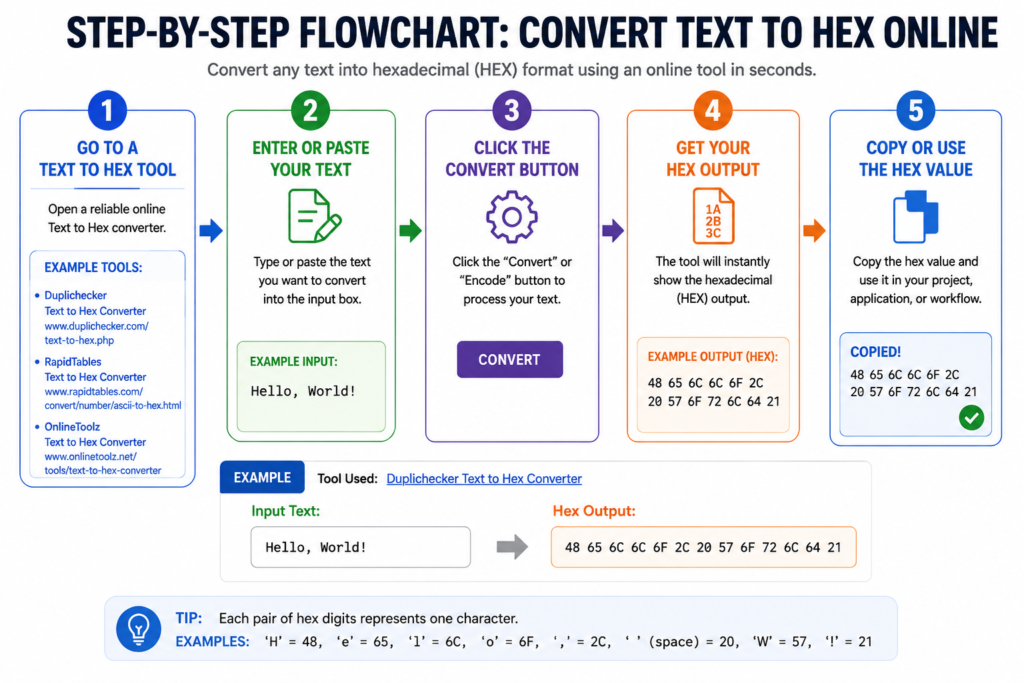
Step 1 – Choose your input.
Decide whether you’re converting a short word, a long sentence, or an entire text file. For files, use Browserling’s upload feature; for small snippets, any tool works.
Step 2 – Pick a reliable online converter.
Open a trusted site — we’ll use Duplichecker’s text‑to‑hex tool in this example. Navigate to the text‑to‑hex page (no sign‑up required).

Step 3 – Paste your text into the input box.
Type or paste your content. The tool will automatically display the hexadecimal output in the adjacent box (RapidTables does live conversion; Duplichecker requires a click).
Step 4 – Click “Convert to Hex”.
If live conversion is not active, press the button. The result appears as a continuous string of hex pairs, often separated by spaces.
Step 5 – Verify the output.
Copy the hex string and use the tool’s reverse function (“Hex to Text”) to decode it back. The original text should reappear, confirming the conversion was accurate.
Step 6 – Copy the hex string for use.
The hex can be pasted into your code, data file, or documentation. Most tools also offer a “Copy” button for one‑click.
6. MANUAL CONVERSION: THE ASCII TO HEX TABLE (PLUS A QUICK JAVASCRIPT SNIPPET)
If you prefer to understand the process (or need to convert text offline), here’s a quick manual method.
- Obtain an ASCII table (many are available for free online).
- For each character, find its decimal code.
- Divide by 16. The quotient is the first hex digit; the remainder is the second.
Example: letter M has decimal 77.
77 ÷ 16 = 4 remainder 13.
4 → 4, 13 → D. So M = 4D.
JavaScript one‑liner (paste in browser console)
javascriptCopyDownload
"Hello, world!".split('').map(c => c.charCodeAt(0).toString(16).padStart(2,'0')).join(' ');
Output:48 65 6c 6c 6f 2c 20 77 6f 72 6c 64 21
This snippet works for any standard ASCII string and is an excellent quick‑check tool.
7. WHEN AND WHERE HEX ENCODING IS ACTUALLY USEFUL
Hex encoding isn’t just a party trick — it’s used in real, practical applications:
- Cryptocurrency – wallet addresses and transaction hashes are hex.
- URL encoding – certain characters in URLs are percent‑encoded with hex (e.g.,
%20for space). - Forensics / reverse engineering – hex dumps allow analysts to inspect raw file content.
- Arduino & IoT – sending commands to hardware often requires hex‑formatted data.
- SQL injection prevention – developers sometimes use hex to encode user input safely.
- Checksums & hash verification – MD5, SHA‑1, and SHA‑256 hashes are all hex strings.
Understanding text to hexadecimal gives you a universal tool to read and write data across all these domains.
8. COMMON MISTAKES AND HOW TO AVOID THEM
- Confusing hex colour codes with hex encoding. Colours like
#FF0000are hex triplets for red‑green‑blue, not character encodings. The tools above are for character encoding, not colour conversion. - Forgetting the encoding. ASCII works for English only. If your text contains emojis or accented letters, you need UTF‑8 support — otherwise the output will be garbled.
- Using insecure or ad‑infested tools. Some free converters inject malicious redirects. Stick to the four recommended tools.
- Not verifying the reverse. Always decode back to text to be sure the conversion was lossless.
- Assuming hex is encryption. Hex encoding offers no secrecy — it’s just a number format. Do not use it to protect passwords.
9. FREQUENTLY ASKED QUESTIONS
1. What is text to hexadecimal conversion?
It’s the process of turning readable characters into their hexadecimal (base‑16) number representations, typically using the ASCII or Unicode standard. Each character becomes a two‑digit hex code.
2. How do I convert text to hex manually?
Look up the decimal code for each character in an ASCII table, divide by 16 to get the quotient and remainder, then map both to hex digits (0‑F). For example, ‘A’ (65) becomes 4×16+1 → 41.
3. Are there any free online text to hex converters?
Yes, Duplichecker, RapidTables, Browserling, and Goteleport all offer free, reliable text‑to‑hex tools. They require no registration and work instantly in your browser.
4. What is the difference between ASCII and hexadecimal?
ASCII is a character‑encoding standard that assigns a number (0–127) to each symbol. Hexadecimal is a base‑16 number system used to represent those numbers more compactly. So ASCII is the map; hexadecimal is the language used to write the coordinates.
5. Can I convert hex back to text?
Absolutely. Every hex string can be decoded back to the original text using a “Hex to Text” converter, or programmatically with String.fromCharCode() in JavaScript.
6. Why would I need to convert text to hex?
Common reasons include debugging raw data, working with cryptographic hashes, programming embedded systems, and inserting special characters into URLs or code where plain text would cause errors.
7. Is hex encoding the same as encryption?
No. Hex encoding is just a different representation of the same data and offers zero security. Encryption scrambles data with a key to make it unreadable without decryption.
8. How do I convert a text file to hex using Python?
Use a simple script: open('file.txt','rb').read().hex(). This reads the file in binary mode and returns a hex string. You can also iterate through characters with .encode().hex() for ASCII.
9. Does hex encoding increase the size of my text?
Yes, each byte (character) becomes two hex digits, plus optional spaces. So a 1 KB text file becomes about 2 KB in hex representation.
10. Where can I find a reliable text to hex converter without ads?
Duplichecker and RapidTables are completely ad‑free and don’t require any sign‑up. Browserling’s free plan also provides a clean, professional interface.
10. CONCLUSION
Converting text to hexadecimal is simpler than it sounds — especially with the free, reliable tools available in 2026. Whether you use an online converter for one‑off tasks or a JavaScript snippet for automated jobs, you now have the knowledge to choose the right method and understand what’s happening behind the scenes.
Remember: ASCII maps characters to numbers, hex represents those numbers in base‑16, and a good converter makes the whole process seamless. Bookmark this guide and the recommended tools so you’re never more than a click away from 68 65 78 20 69 73 20 65 61 73 79 (hex is easy).
For even more free utilities, explore our Free SEO Tools collection where you’ll find hex converters, encoders, and more.