

INTRODUCTION
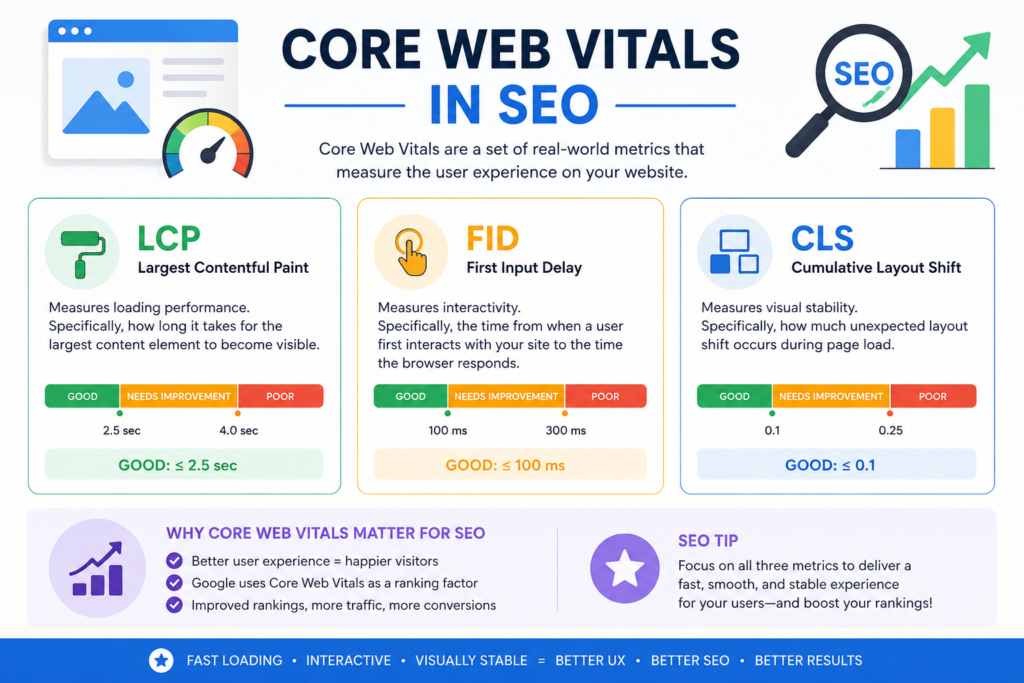
Did you know that 53% of mobile users abandon a site if it takes longer than three seconds to load? That’s not just a user experience problem – it’s a revenue and ranking disaster. Google has officially replaced First Input Delay (FID) with Interaction to Next Paint (INP) , and now all three Core Web Vitals measure real, user‑centric performance.
In simple terms, Core Web Vitals are Google’s set of standardized metrics that quantify how real people experience loading, interactivity, and visual stability on your site. The 2026 update makes INP the sole responsiveness metric, leaving FID in the history books.
In this 2026 Core Web Vitals checklist, you will learn:
- The exact thresholds for LCP, INP, and CLS – and what “good” really means
- How to audit your site with field data (what Google actually uses) vs lab data
- Actionable, platform‑specific code fixes for image load, JavaScript delays, and layout shifts
- A 7‑step monitoring workflow to keep your scores in the green after every deployment
Let’s open PageSpeed Insights and start your optimisation journey.
WHAT ARE CORE WEB VITALS IN 2026?
Core Web Vitals are user‑centric performance metrics that Google uses as ranking signals. They answer three questions: “Does it load fast?” (LCP), “Does it respond quickly when I tap or click?” (INP), and “Does the page jump around while loading?” (CLS).
As of May 2026, the three official metrics are:
| Metric | Full Name | What It Measures | Good Score | Needs Improvement | Poor |
|---|---|---|---|---|---|
| LCP | Largest Contentful Paint | Loading speed of the main content block | ≤ 2.5 seconds | 2.5 – 4 seconds | > 4 seconds |
| INP | Interaction to Next Paint | Responsiveness to all user taps, clicks, and key presses | ≤ 200 milliseconds | 200 – 500 ms | > 500 ms |
| CLS | Cumulative Layout Shift | Visual stability (unexpected movement) | ≤ 0.1 | 0.1 – 0.25 | > 0.25 |
Why does Google care so much? Back in the PageRank era, links and keywords ruled. Now Page Experience is a core ranking factor. Google measures your site’s performance at the 75th percentile of real user visits (field data). That means three out of four real visits must meet the “good” threshold for you to pass.
Key 2026 change: INP now replaces FID entirely. FID only measured the first interaction; INP tracks every interaction (click, tap, keyboard) across the whole page session. That makes it much harder – and more accurate.
FIELD DATA VS LAB DATA – THE CRITICAL DIFFERENCE
One of the biggest mistakes SEOs make is optimising only for synthetic lab tests. Google ranks you based on field data – real Chrome users visiting your site.
🔹 Field Data (Real Users, Real Devices, Real Networks)
- Collected from millions of Chrome browsers (with user consent)
- Aggregated in the Chrome UX Report (CrUX)
- Tools: PageSpeed Insights (field section) , Google Search Console CWV report, CrUX API
- Used for ranking – no field data = not considered for CWV ranking boost
🔹 Lab Data (Simulated, Controlled Environment)
- Runs on a single device with emulated network/throttling
- Tools: Lighthouse, WebPageTest, DebugBear, GTmetrix
- Great for debugging, bad for judging real‑world performance
The golden rule: Use field data to decide what to fix (because that’s what Google sees). Use lab data to diagnose how to fix it.
Example: PageSpeed Insights shows your Origin field data (aggregate across all pages) and URL‑level field data (if enough visits). If your URL has “insufficient data,” Google looks at origin data.
HOW TO AUDIT YOUR CORE WEB VITALS (7‑STEP PROCESS)
Follow this numbered checklist exactly. Each step tells you what to do, which tool to use, and what to look for.
Step 1 – Run PageSpeed Insights for your URL
- Tool: PageSpeed Insights
- What to do: Enter your URL, run both mobile and desktop tests.
- Look for: The “Core Web Vitals assessment” label – PASS or FAIL. Also note individual LCP, INP, CLS values in the field data section.
Step 2 – Open Google Search Console’s Core Web Vitals report
- Tool: Search Console → “Experience” → “Core Web Vitals”
- What to do: Filter by “Mobile” and “URL group” (or “URL”).
- Look for: Red “Poor” URLs and yellow “Needs Improvement” URLs. These are your top priorities.
Step 3 – Identify which metric is failing (LCP, INP, or CLS)
- Tool: Same reports (PageSpeed Insights and Search Console)
- What to do: Check the 75th percentile values. For example: LCP = 3.2s (Poor), INP = 180ms (Good), CLS = 0.22 (Poor).
- Look for: One or more metrics in the red zone.
Step 4 – Prioritise fixes using field data (not lab data)
- Tool: CrUX Dashboard on BigQuery or DebugBear field data
- What to do: Sort issues by impact. A site with 80% of users having Poor INP should fix responsiveness first.
- Look for: Metrics that are consistently Poor across device types and regions.
Step 5 – Fix LCP issues (see Section 5)
- Follow the LCP optimisation checklist below. Implement image preload, upgrade hosting, or defer CSS.
- Re‑test with Lighthouse lab data to validate.
Step 6 – Fix INP issues (see Section 6)
- Break up long JavaScript tasks, remove slow third‑party scripts, and use Web Workers for heavy computation.
- Verify with INP debugging in Chrome DevTools (Performance tab).
Step 7 – Fix CLS issues (see Section 7)
- Add explicit width/height to all media, reserve space for ads, and set
font-display: optionalorswap. - Re‑measure with field data via CrUX – wait 28 days for new data.
Step 8 – Re‑measure and monitor continuously
- Set up weekly reports with DebugBear or SpeedCurve.
- Re‑run the audit after every major code or plugin change.
LCP OPTIMIZATION CHECKLIST (2026 EDITION)
Largest Contentful Paint (LCP) measures when the main content element (hero image, video poster, large text block) renders. Target: ≤ 2.5 seconds.
Optimize Images for LCP
Problem: A large, unoptimised hero image delays LCP.
Fix: Convert to WebP or AVIF, compress, and set fetchpriority="high" on the LCP image.
htmlCopyDownloadRun
<!-- Good: preload + high priority + WebP -->
<img src="hero-image.webp" fetchpriority="high" width="1200" height="600" alt="Hero banner">
<link rel="preload" as="image" href="hero-image.webp">
Additional tip: Do NOT lazy‑load your LCP element. Remove loading="lazy" from the LCP image.Improve Server Response Time (TTFB)
Problem: Slow backend or uncached database queries push TTFB over 600ms, delaying LCP.
Fix: Use a CDN (Cloudflare, BunnyCDN), enable full‑page caching, and upgrade to a faster hosting plan (Kinsta, WP Engine, Vercel).
nginxCopyDownload
# Example Nginx caching header
add_header Cache-Control "public, max-age=604800, stale-while-revalidate=86400";
Eliminate Render‑Blocking Resources
Problem: CSS and JS files blocking the main thread.
Fix: Inline critical CSS (above‑fold styles) and defer non‑critical CSS/JS.
htmlCopyDownloadRun
<!-- Defer non-critical JS -->
<script src="analytics.js" defer></script>
<!-- Preload CSS then apply -->
<link rel="preload" href="styles.css" as="style" onload="this.onload=null;this.rel='stylesheet'">
<noscript><link rel="stylesheet" href="styles.css"></noscript>
Use Resource Hints
Add preconnect to third‑party origins (Google Fonts, CDNs) and dns-prefetch for others.
htmlCopyDownloadRun
<link rel="preconnect" href="https://fonts.googleapis.com">
<link rel="dns-prefetch" href="https://analytics.example.com">
INP OPTIMIZATION CHECKLIST – REPLACING FID
Interaction to Next Paint (INP) measures responsiveness across all clicks, taps, and key presses. Target: ≤ 200 milliseconds.
Reduce JavaScript Execution Time
Long JS tasks (>50ms) block the main thread, delaying the next paint after an interaction.
Fix: Split large bundles, remove unused code, and use requestIdleCallback() for non‑critical work.
javascriptCopyDownload
// Bad: blocking loop
for (let i = 0; i < 1000000; i++) { /* heavy compute */ }

// Good: yield to browser
function chunkedTask() {
  let i = 0;
  function doChunk() {
    const end = Date.now() + 16; // 16ms budget
    while (Date.now() < end && i < 1000000) { i++; }
    if (i < 1000000) requestIdleCallback(doChunk);
  }
  requestIdleCallback(doChunk);
}
Break Up Long Tasks with Scheduler API or setTimeout
Fix: Use scheduler.yield() (available in Chrome 2025+) or manual yielding.
javascriptCopyDownload
async function longTask() {
  for (let i = 0; i < 100; i++) {
    heavyStep();
    await scheduler.yield(); // hands control back to browser
  }
}
Audit Third‑Party Scripts
Problem: Google Tag Manager, Facebook Pixel, or embedded chats often cause high INP.
Fix: Load third‑party scripts with async or defer, delay non‑critical scripts until after user interaction, or use Partytown to move them to a Web Worker.
htmlCopyDownloadRun
<!-- Load only after user clicks anywhere -->
<script>
  window.addEventListener('click', function() {
    var script = document.createElement('script');
    script.src = 'chat-widget.js';
    document.head.appendChild(script);
  }, { once: true });
</script>
Use Web Workers for Heavy Computation
Move expensive processing (parsing large JSON, image manipulation) off the main thread.
javascriptCopyDownload
// main.js
const worker = new Worker('heavy-task.js');
worker.postMessage(largeDataSet);
worker.onmessage = (e) => console.log('Result ready', e.data);

// heavy-task.js
self.onmessage = (e) => {
  const result = expensiveCalculation(e.data);
  self.postMessage(result);
};
CLS OPTIMIZATION CHECKLIST
Cumulative Layout Shift (CLS) measures unexpected movement of page elements. Target: ≤ 0.1.
Always Set Width and Height on Images and Videos
Problem: Browsers don’t know image dimensions until they load, causing a layout jump.
Fix: Include width and height attributes (even for responsive images).
htmlCopyDownloadRun
<img src="photo.jpg" width="800" height="450" alt="Example" style="width:100%; height:auto;">
Reserve Space for Ads and Embeds
Fix: Use CSS min-height on ad slots or placeholders with exact aspect ratio.
htmlCopyDownloadRun
<div class="ad-slot" style="min-height: 250px; background: #f5f5f5;">
  <!-- Ad code loads here, but space is already reserved -->
</div>
Control Web Font Loading with font-display
Problem: FOIT (Flash of Invisible Text) or FOUT causes text reflow.
Fix: Use font-display: optional (best for CLS) or font-display: swap.
cssCopyDownload
@font-face {
  font-family: 'CustomFont';
  src: url('font.woff2') format('woff2');
  font-display: optional; /* No layout shift, uses fallback until font is ready */
}
Avoid Injecting Content Above Existing Content
Never dynamically insert a banner, cookie notice, or newsletter popup at the top of the page unless it’s reserved. Instead, inject it at the bottom or use a toast notification.
Fix: If you must show a top banner, reserve its space via position: sticky or use transform: translateY() for animation.
cssCopyDownload
.top-banner {
  position: sticky;
  top: 0;
  min-height: 50px; /* Reserve the exact height */
  visibility: hidden; /* Reserve space without showing */
}
.top-banner.visible { visi
PLATFORM‑SPECIFIC CORE WEB VITALS FIXES
🔸 WordPress / WooCommerce
- Use caching plugin: NitroPack, WP Rocket, or LiteSpeed Cache for WordPress (LSCWP).
- Replace heavy page builders (Elementor, Divi) with GenerateBlocks or native Gutenberg.
- Disable unused plugins – each adds JS/CSS. Run a plugin audit monthly.
- Optimise WooCommerce: Use a lightweight theme (Storefront or Blocksy), defer cart fragments script.
🔸 Shopify
- Choose a fast theme: Dawn (official) or Symmetry (minimal).
- Lazy‑load offscreen images using
loading="lazy"(Shopify Liquid supports it). - Audit and remove unnecessary Shopify apps – each adds remote scripts.
- Use Shopify’s built‑in CDN and compress images via Crush.pics app.
🔸 Next.js / React
- Replace
imgwith next/image component (automatic optimisation, lazy loading, and size hints). - Use Dynamic Imports with
next/dynamicto split client‑side bundles. - Enable Partial Prerendering (PPR) (experimental in Next.js 15, stable in 2026) to reduce hydration delays.
- Implement Incremental Static Regeneration (ISR) for product pages.
jsxCopyDownload
// Good: next/image with explicit dimensions
import Image from 'next/image';
<Image src="/hero.jpg" width={1200} height={600} priority />

// Better: dynamic import for heavy components
const HeavyChart = dynamic(() => import('../components/Chart'), { ssr: false });
MONITORING CORE WEB VITALS CONTINUOUSLY
A one‑time audit is like a single health check – it won’t keep you fit. Code changes, new plugins, and traffic spikes constantly affect your Core Web Vitals.
Use Google Search Console (free)
- The Core Web Vitals report shows which URL groups are Poor, Needs Improvement, or Good.
- Filter by “Mobile” only (desktop CWV is not a ranking factor in 2026, though still helpful).
Set up CrUX API alerts
- Connect CrUX data to Google Sheets via
=CRUX()custom function or use DebugBear to monitor daily. - Alert when LCP exceeds 2.5s or INP > 200ms for more than 5% of users.
Use commercial monitoring tools
- DebugBear – tracks field data + lab data, shows third‑party script impact.
- SpeedCurve – integrates with CI/CD to block PRs that degrade CWV.
- Calibre – offers Slack alerts and budget thresholds.
Connect CWV to business metrics
- A 0.1s improvement in LCP can increase conversion rates by 2–5% (ecommerce data).
- Poor CLS (>0.25) correlates with 15% higher bounce rates.
- Present these numbers to stakeholders to justify performance budgets.
FAQ
1. What are Core Web Vitals in 2026?
Core Web Vitals are Google’s three user‑centric performance metrics: Largest Contentful Paint (loading speed), Interaction to Next Paint (responsiveness), and Cumulative Layout Shift (visual stability). They are ranking factors based on real user field data.
2. What replaced FID in Google’s Core Web Vitals?
Interaction to Next Paint (INP) replaced First Input Delay (FID) in March 2024. INP measures the latency of every interaction (click, tap, key press) throughout the page lifecycle, not just the first one.
3. What is a good LCP score?
A good Largest Contentful Paint score is 2.5 seconds or less at the 75th percentile of real user visits. Scores between 2.5s and 4s need improvement; above 4s are poor.
4. What is a good INP score?
A good Interaction to Next Paint score is 200 milliseconds or less. Scores from 200ms to 500ms need improvement; above 500ms is poor.
5. What is a good CLS score?
A good Cumulative Layout Shift score is 0.1 or less. Scores from 0.1 to 0.25 need improvement; above 0.25 is poor.
6. How do I check my Core Web Vitals score?
Open Google Search Console and go to “Experience” → “Core Web Vitals”. Alternatively, enter your URL in PageSpeed Insights – the “Field Data” section shows CrUX real‑user metrics. Lighthouse gives lab data for debugging.
7. Do Core Web Vitals directly affect Google rankings?
Yes, they are explicit ranking signals for mobile search results. However, they are not the strongest signals – high‑quality content still dominates. But if two pages have similar relevance, the one with better Core Web Vitals wins.
8. What is the difference between field data and lab data for CWV?
Field data comes from real Chrome users (the Chrome UX Report) and is what Google uses for ranking. Lab data comes from simulated tests like Lighthouse. Use field data to identify issues, lab data to debug them.
9. How do I fix a slow LCP?
Start by identifying your LCP element in DevTools (usually a hero image or text block). Then: compress and convert that image to WebP, set fetchpriority="high", eliminate render‑blocking CSS/JS, and improve server TTFB with CDN and caching. See Section 5 for the full checklist.
10. How do I reduce Cumulative Layout Shift?
Always set explicit width and height on all images and videos. Reserve space for ads, embeds, and popups using min-height or CSS aspect‑ratio boxes. Use font-display: optional for web fonts. Never inject content above existing content dynamically.
CONCLUSION
You now have a complete 2026 Core Web Vitals checklist – from auditing real field data to applying code‑level fixes for LCP, INP, and CLS. Remember the three pillars: load fast (LCP), respond instantly (INP), and stay still (CLS).
The business case for optimisation goes beyond rankings. Faster, smoother websites generate more leads, sales, and return visitors. Every millisecond you shave off INP or layout shift you eliminate keeps a user engaged.
Your next step: Bookmark this page and re‑run your audit every time you ship major changes. For deeper dives, check out our Technical SEO Checklist 2026 and Page Speed Optimization Guide.
Ready to pass the Page Experience test? Open PageSpeed Insights and start fixing.