

How to Do a Website SEO Audit: The Complete 2026 Step-by-Step Guide

Imagine driving a car for years without ever checking the oil, tire pressure, or brake pads. Eventually, something breaks—and it always breaks at the worst possible moment. Your website works the same way. Behind every page that ranks well, there’s a foundation of technical health that most site owners never inspect. A website SEO audit is that inspection—and skipping it is the single most common reason sites underperform for months or even years without anyone knowing why.
Industry research reveals a startling picture: the average website has over 4,500 crawl-detected SEO issues lurking beneath the surface. Nearly 29% of pages contain duplicate content of some form, 34% are missing meta descriptions entirely, and only about 12% of mobile pages pass all three of Google’s Core Web Vitals thresholds. These aren’t rare edge cases—they’re the norm.
This guide will walk you through every layer of a complete SEO audit, from verifying that Google can even access your pages, to optimizing load speeds that silently drive visitors away, to auditing the backlinks that build (or break) your authority. By the end, you’ll have a repeatable process that turns hidden problems into measurable ranking gains.
What Exactly Is a Website SEO Audit?
A website SEO audit is a structured examination of your site across four interconnected dimensions: technical infrastructure (can search engines reach and understand your pages?), on-page elements (are your titles, headings, and content optimized?), content quality (does each page satisfy what the user actually wants?), and off-page signals (do other sites treat yours as an authority?).
Think of it as a diagnostic checkup rather than a one-time fix. Search engines like Google evaluate hundreds of signals before deciding where to place a page in search results. Many of those signals are invisible without dedicated tools—crawl depth, canonical conflicts, redirect chains, structured data errors, and Core Web Vitals performance. A well-executed audit surfaces issues that even excellent content cannot compensate for on its own.
Regular audits also support Answer Engine Optimization (AEO) – the practice of structuring content so that AI-powered search assistants like Google’s AI Overviews and voice search platforms can extract your information. For a broader view, explore Google’s SEO Starter Guide.

When Should You Run an SEO Audit?
The minimum recommended frequency is once per quarter. Surveys of SEO specialists reveal that most professionals audit their sites roughly every three months on average. However, certain events demand an immediate audit regardless of the calendar:
- Site migrations or domain changes — moving to a new domain can introduce hundreds of broken redirects and indexing errors overnight.
- CMS updates or complete redesigns — even minor platform upgrades can alter your URL structure, meta tags, or robots.txt configuration.
- Unexpected traffic drops — a sudden decline in Google Analytics almost always has a technical root cause that an audit can pinpoint.
- Before and after launching a major content campaign — verify that new pages are being crawled and indexed properly.
- After adding new functionality — e-commerce stores, membership portals, or forums each introduce new crawl paths that need verification.
📊 The Hidden Cost of Skipping Audits
Websites that perform routine SEO audits have reported up to a 61% increase in organic traffic after systematically fixing discovered issues. Meanwhile, the top 3 Google results capture approximately 68.7% of all clicks—and sites with unresolved technical issues rarely reach those positions.
Essential SEO Audit Tools: Free vs. Paid Comparison
You don’t need an enterprise budget to run a thorough audit. Free tools cover roughly 70% of what paid alternatives offer. Here’s a breakdown of the most effective options across both tiers:
| Tool | Best For | Free Tier | Paid Starting Point |
|---|---|---|---|
| Google Search Console | Indexing status, crawl errors, Core Web Vitals field data | ✅ Fully free, unlimited | N/A |
| Google PageSpeed Insights | Page-level performance scoring, CWV lab data | ✅ Fully free, unlimited | N/A |
| Screaming Frog | Full-site crawling, broken links, redirect audits | ✅ Up to 500 URLs | ~$279/year (unlimited) |
| Ahrefs Webmaster Tools | Backlink profile, site health score, internal linking | ✅ For verified site owners | From $129/month |
| Sitebulb | Visual crawl reports, structured data validation | ❌ 14-day trial | From $35/month |
| Google Analytics | Traffic trends, engagement metrics, conversion paths | ✅ Fully free, unlimited | N/A |
For most site owners, combining Google Search Console with the free tier of Screaming Frog provides an extremely powerful audit foundation at zero cost.
Step 1: Verify Crawlability and Indexability
If search engines cannot reach your pages, nothing else matters. This is the absolute foundation of every audit. Start by confirming that Googlebot can access your site and that the right pages are being indexed.
Robots.txt Analysis
Your robots.txt file sits at the root of your domain and tells crawlers where they can and cannot go. Open it directly at yourdomain.com/robots.txt. Check for the directive Disallow: /—this blocks your entire site. Also verify you’re not accidentally blocking CSS or JavaScript files, because search engines need these to render pages correctly for mobile-first indexing. Your XML sitemap location should be explicitly listed in the file.
XML Sitemap Validation
Your XML sitemap serves as the roadmap for search engines. Submit it to Google Search Console and verify that it contains only clean, 200-status URLs. Remove any redirects, 404 errors, or pages blocked by noindex tags. For sites exceeding 50,000 URLs, use an index sitemap that organizes multiple sitemaps logically by content type.
Index Coverage Deep Dive
Open Google Search Console and navigate to Index → Coverage. This report categorizes every URL Google has encountered. Pay special attention to pages marked “Crawled – currently not indexed”—this often signals thin content, duplicate issues, or quality problems. Also investigate any pages labeled “Submitted URL not found (404)” or “Blocked by robots.txt.” Each excluded page represents a missed ranking opportunity.
Step 2: Run a Comprehensive Site Crawl
Google Search Console shows you what Google sees, but a dedicated crawler shows you everything. Tools like Screaming Frog and Sitebulb simulate a search engine bot’s journey through your site and catalog every technical signal along the way. For additional perspective, see how Semrush approaches site audits.
Fire up Screaming Frog (the free version handles up to 500 URLs), enter your domain, and let it run. Once complete, focus on these high-impact areas:
- 4xx Client Errors — broken internal links create dead ends for both users and crawlers. Fix the link or implement a 301 redirect to the closest relevant live page.
- 5xx Server Errors — these indicate your server cannot fulfill requests for certain pages. Address immediately; Google may de-index pages that consistently return server errors.
- Redirect Chains — URLs that redirect through multiple hops before landing waste crawl budget and dilute link equity. Replace chains with single direct 301s.
- Canonical Tag Issues — pages missing canonical tags or with conflicting canonicals confuse search engines about which version to index and rank.
- Orphan Pages — pages with zero internal links pointing to them. Search engines struggle to discover and index orphaned content.
Step 3: Audit On‑Page SEO Elements
With the technical foundation verified, shift to the elements visible on each page. On‑page factors directly influence both rankings and click-through rates from search results.
Title Tags and Meta Descriptions
Every page on your site needs a unique, descriptive title tag that includes your primary keyword naturally. Titles should stay under roughly 60 characters to avoid truncation in search results. Meta descriptions—while not direct ranking factors—dramatically impact click-through rates. Keep them under 160 characters, make each one unique, and write them as compelling invitations to click, not robotic keyword lists. Duplicate title tags across multiple pages confuse search engines and dilute your ability to rank for distinct queries.
Heading Hierarchy
Each page should have exactly one H1 heading that clearly states the page’s topic. Subheadings (H2, H3, H4) should follow a logical hierarchy—never skip levels. A well-structured heading outline helps both readers using screen readers and search engines parsing your content’s semantic structure. This is especially important for AI-powered search: clear heading hierarchies make it easier for large language models to extract and summarize your content accurately.
Step 4: Evaluate Content Quality and Search Intent Alignment
Technical perfection means nothing if your content doesn’t satisfy what users actually want. This is where search intent becomes critical.
For every key page, ask: does the content match what the searcher expects to find? An informational query deserves a thorough guide with definitions and explanations. A commercial investigation query might need comparison tables and pros/cons analysis. A transactional query requires clear product information, pricing, and purchase paths. When intent and content misalign, bounce rates climb—and elevated bounce rates send negative engagement signals to search engines.
Beyond intent, evaluate each page against four criteria:
- Originality — does the page provide unique value, research, or perspective, or is it rehashing what dozens of competitors already cover?
- Depth — is the topic covered thoroughly enough to answer the user’s question completely, or does it leave them needing to search again?
- Freshness — are statistics, examples, and references current? Pages with outdated information erode trust and may be demoted by freshness-sensitive algorithms.
- Readability — are paragraphs short (2–3 sentences)? Is the language clear and jargon‑free? Do subheadings break long sections into scannable chunks?
Flag thin content pages—those with fewer than 300 words of substantive, original material. Either expand them with additional depth, examples, and data, or consider consolidating multiple thin pages into a single comprehensive resource that better serves users.
Step 5: Analyze Core Web Vitals, Speed, and Mobile Usability
Google uses real‑world performance data collected from Chrome users to evaluate your site. Three metrics, collectively called Core Web Vitals, directly influence your rankings:
| Metric | What It Measures | Good | Needs Improvement | Poor |
|---|---|---|---|---|
| LCP (Largest Contentful Paint) | How quickly the main content loads | ≤ 2.5s | 2.5s – 4.0s | > 4.0s |
| INP (Interaction to Next Paint) | Page responsiveness to taps and clicks | ≤ 200ms | 200ms – 500ms | > 500ms |
| CLS (Cumulative Layout Shift) | Visual stability during loading | ≤ 0.1 | 0.1 – 0.25 | > 0.25 |
Run your homepage, key category pages, and top‑traffic blog posts through Google PageSpeed Insights. The tool provides both real‑user field data and lab‑based recommendations specific to each page. For a deep dive into speed optimization, the Ahrefs Site Audit tool also benchmarks your performance against competitors.
Common quick wins include compressing images and converting them to WebP format, enabling browser caching with appropriate expiry headers, minifying CSS and JavaScript, eliminating render‑blocking resources, and using a Content Delivery Network (CDN) to serve assets from locations closer to your visitors. If your server’s Time to First Byte (TTFB) exceeds 800 milliseconds, investigate your hosting infrastructure or implement server‑side page caching.
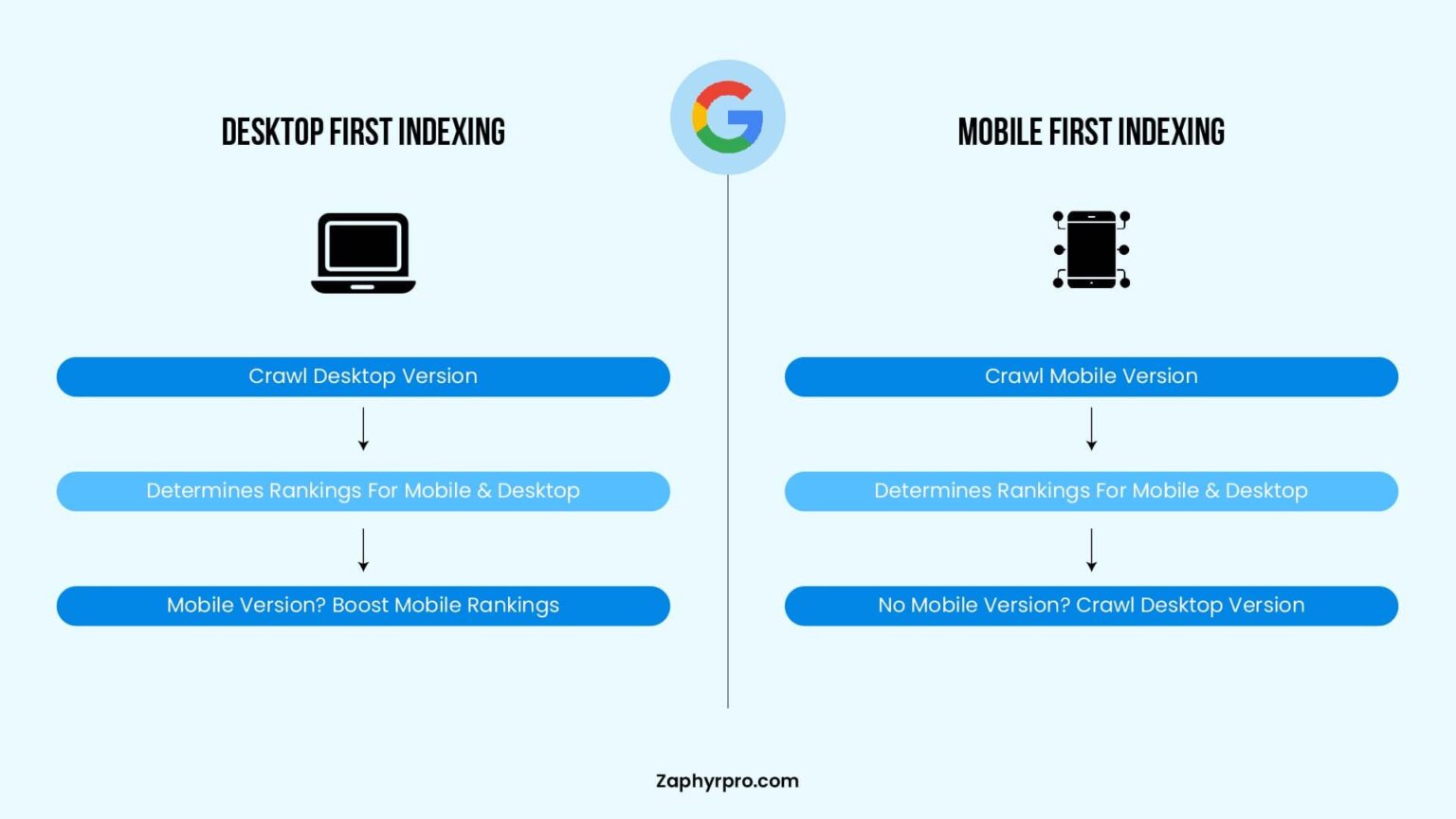
Also test mobile usability explicitly. Google primarily uses the mobile version of your site for indexing and ranking—a practice called mobile‑first indexing. Use Google’s Mobile‑Friendly Test to verify tap targets are adequately sized, text is readable without zooming, and the mobile experience matches desktop in content completeness.
Step 6: Review Internal Linking and Site Architecture
Internal links serve two critical purposes simultaneously: they guide users to related content, and they tell search engines how your pages relate to each other. A weak internal link structure means some pages receive regular crawl attention while others are effectively invisible.
Start by finding orphan pages—pages with zero internal links pointing to them. These pages have no reliable discovery path for search engines. Add contextual internal links from topically related, higher‑authority pages on your site. Each link should use descriptive anchor text that tells both users and search engines what to expect on the destination page.
Next, check crawl depth: the number of clicks required to reach any page from the homepage. Important pages should be reachable within three to four clicks. Pages buried deeper receive less frequent crawls and diminished link equity. Streamline your navigation, use breadcrumb trails, and ensure your most valuable content sits close to the surface of your site structure.
Step 7: Audit Structured Data and Schema Markup
Structured data—implemented using Schema.org vocabulary in JSON‑LD format—helps search engines understand the entities and relationships within your content. It also enables rich results: star ratings, FAQ dropdowns, breadcrumb paths, product pricing, and more in search listings. These enhancements can boost click‑through rates by 20–30% by making your result visually prominent.
Yet approximately 80% of websites use no schema markup at all. This represents enormous low‑hanging fruit. During your audit, check whether your pages carry appropriate schema types:
- Article schema for blog posts and news content.
- FAQPage schema for pages with question‑and‑answer content—this can earn expandable rich results.
- Product schema for e‑commerce pages, including price, availability, and review data.
- BreadcrumbList schema for navigation paths.
- Organization or LocalBusiness schema for your brand’s entity information.
Validate your implementation using Google’s Rich Results Test. Each page with schema markup gains an additional layer of discoverability—not just in traditional search, but in AI‑powered results that increasingly draw from structured data to generate accurate summaries.
Step 8: Examine Backlink Health and Off‑Page Signals
While off‑page SEO is sometimes treated as its own discipline, certain elements of your backlink profile belong in every audit cycle. A toxic backlink profile can trigger manual penalties that no amount of on‑site optimization can undo.
Export your full backlink profile using Ahrefs Webmaster Tools (free for verified site owners), Semrush, or the Links report in Google Search Console. Look for these patterns:
- Spammy or irrelevant links from low‑quality domains. Links from unrelated foreign‑language sites, link farms, or domains with uniformly low authority scores may be actively harming your profile. Use Google’s Disavow Tool judiciously—only for links that clearly cross the spam threshold.
- Broken pages receiving backlinks. When an external site links to a page that now returns a 404, all the ranking value that link once provided evaporates. Restore valuable content that earned links, or 301‑redirect the URL to the most relevant live page.
- Anchor text distribution. An unnatural concentration of exact‑match commercial anchor text can trigger algorithmic scrutiny. Ensure your backlink anchor text profile looks natural—a mix of branded anchors, naked URLs, generic phrases, and some keyword‑rich text.
- Inconsistent brand citations. Verify your business name, address, and phone number are consistent across directories, social profiles, and brand mentions. Conflicting NAP data sends mixed entity signals to search engines.
Step 9: Prioritize Findings and Build an Action Plan
An audit that surfaces 200 issues without a structured plan to address them is not useful—it’s overwhelming. Prioritization transforms raw data into actionable progress.
🔴 Critical Fix
Address immediately:
- Crawl blocks (robots.txt, noindex)
- 5xx server errors
- HTTPS failures
- XML sitemap errors
- Major CWV failures (LCP > 4s)
🟡 High Priority
This sprint:
- Broken internal links
- Missing canonical tags
- Duplicate title tags
- Redirect chains
- Missing meta descriptions
🟢 Low Priority
Backlog:
- Minor image alt text gaps
- Cosmetic URL formatting
- Informational notices
- Open Graph tag refinements
- Long‑tail keyword expansion
Document every issue with a clear description, the affected URLs, the recommended fix, the person responsible, and a target completion date. Update this document after every audit cycle. Over time, it becomes an institutional record of your site’s technical evolution—and the foundation of continuous SEO improvement.
Frequently Asked Questions About Website SEO Audits
What is a website SEO audit and why do I need one?
A website SEO audit is a structured analysis of your site’s technical health, on‑page elements, content quality, and off‑page signals. The average website has over 4,500 crawl‑detected issues. Without regular audits, these hidden problems silently suppress your rankings.
How often should I perform an SEO audit?
At minimum, quarterly. For large or frequently updated sites, monthly. Always audit after migrations, redesigns, or unexpected traffic drops.
What tools do I need?
Start with free tools: Google Search Console, Google Analytics, Google PageSpeed Insights, and Screaming Frog (up to 500 URLs). Paid options like Ahrefs or Semrush add deeper backlink analysis.
What’s the difference between technical and on‑page audits?
Technical audits inspect crawlability, indexing, speed, and security. On‑page audits focus on titles, meta descriptions, headings, and content quality. Do the technical first.
How do I check if search engines can crawl my site?
Use Google Search Console’s Coverage report, check your robots.txt, validate your XML sitemap, and run a crawler like Screaming Frog.
What are Core Web Vitals?
Real‑world metrics measuring load speed (LCP), interactivity (INP), and visual stability (CLS). They are ranking signals. Only 12% of mobile pages pass all three.
How do I fix broken links?
Identify 4xx/5xx errors with a crawler, update or remove broken internal links, and 301‑redirect pages that moved to the closest relevant live page.
Can I audit my site for free?
Yes. Google Search Console, PageSpeed Insights, and limited versions of Screaming Frog and Ahrefs Webmaster Tools offer excellent free auditing capabilities.
How long until I see results after fixing issues?
Technical fixes can show improvement within days. Content and ranking growth typically takes 3–6 months. Routine audits have been linked to up to 61% traffic increases.
Audits Are Ongoing
A website SEO audit is not a one‑time task—it’s a recurring discipline. Google makes thousands of algorithm changes each year, and each one can expose previously benign issues. The sites that rank consistently year after year are the ones that do the technical work correctly—and keep doing it.
Start with the fundamentals: verify crawlability, fix broken links and redirect chains, secure your site with HTTPS, and optimize Core Web Vitals. Then move into structured data, mobile‑first readiness, internal linking improvements, and backlink health. Prioritize ruthlessly and document everything.
The sites that win treat SEO as an ongoing diagnostic practice rather than a launch‑day checklist. Use this guide as your starting point. Build a repeatable process around it. Over time, the compound effect of regular audits will produce rankings that your competitors cannot easily replicate—because they’re built on a foundation that’s continuously maintained, not patched together when things break.
Ready to get started? Open Google Search Console right now and check your Coverage report. Or run your domain through the free Screaming Frog crawler. Even identifying three critical issues this week can move the needle more than publishing five new articles on a broken foundation.