

1. INTRODUCTION
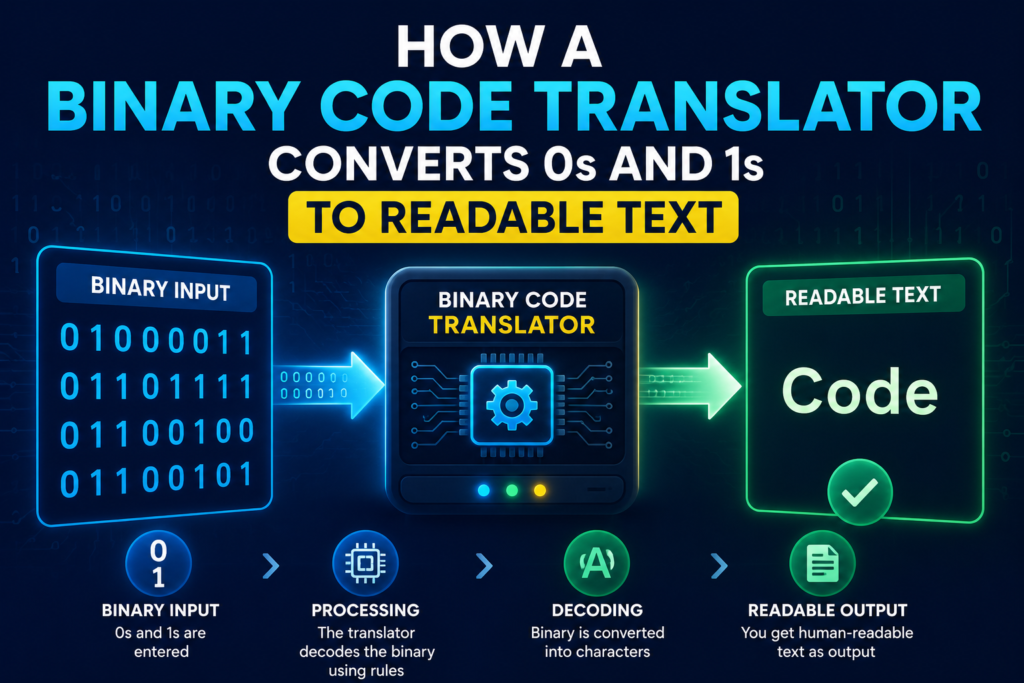
Every piece of digital information – from this sentence to the photo on your lock screen – ultimately boils down to a string of zeros and ones. That’s binary code, the universal language of computers. But staring at a block like 01001000 01101001 doesn’t help anyone; you need a binary code translator to turn it back into readable text.
In 2026, you don’t need to be a programmer or a mathematician to understand binary. Free online tools do the heavy lifting instantly, and this guide will walk you through exactly how to use them – plus how the magic works under the hood.
Here’s what you’ll learn:
- What binary code is and why translation matters.
- How to use a free online binary code translator in seconds.
- A manual conversion method you can do with pen and paper.
- Real‑world applications, from debugging data to decoding secret messages.
- Common mistakes and how to fix them.
Whether you’re a student, a developer, or just curious, this is your all‑in‑one binary translation resource.
2. WHAT IS BINARY CODE AND WHY TRANSLATE IT?
Binary code is a number system that uses only two digits: 0 and 1. Computers use it because their basic components – transistors – have two states: on (1) and off (0). Every letter you type, every colour on your screen, and every sound you hear is stored as a sequence of binary digits, or “bits.”
Translation becomes necessary because humans don’t natively read binary. A binary code translator converts binary sequences (usually grouped in 8‑bit bytes) back into characters we recognise – letters, numbers, punctuation, and symbols.
Common reasons to translate binary include:
- Debugging software – raw data dumps often appear in binary or hexadecimal.
- Learning computer science – understanding how encoding works.
- Decoding secret messages – puzzles, escape rooms, and fun hidden‑message games.
- Programming – converting binary literals to strings in JavaScript or Python.
- Forensics – examining file headers and network packets.
In short, a binary translator bridges the gap between machine language and human language.
3. HOW BINARY CODE TRANSLATION WORKS (ASCII, UNICODE, AND THE MATH)
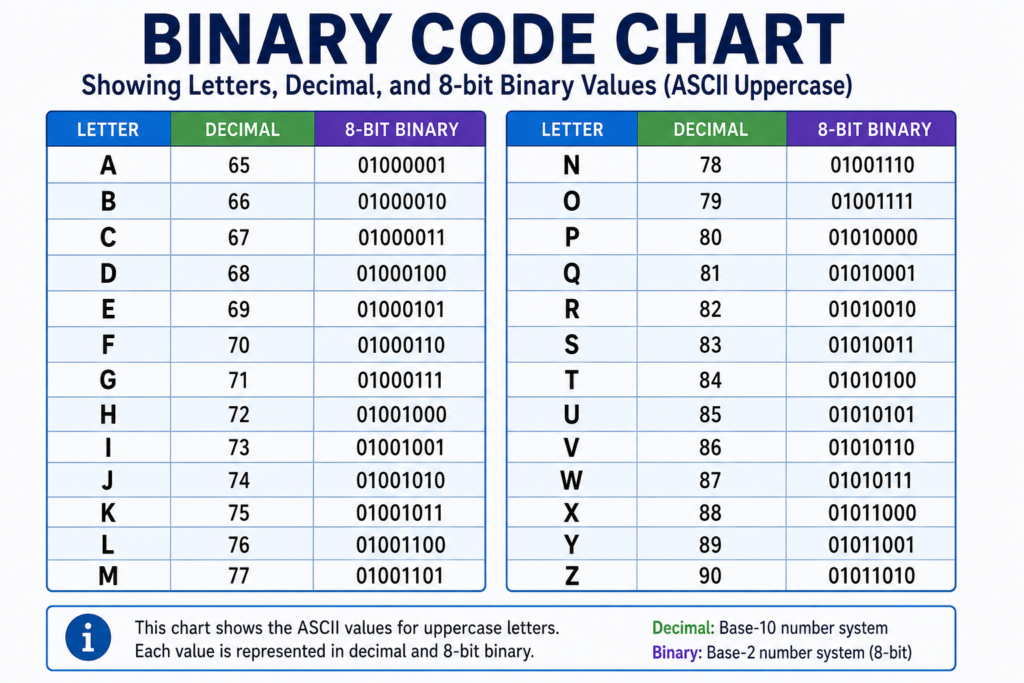
The most basic mapping is the ASCII (American Standard Code for Information Interchange) standard. Each character is assigned a decimal number; for example, uppercase “A” is 65. That decimal number is then represented in binary as an 8‑bit sequence: 01000001.
Here’s the formula: each bit position represents a power of 2, starting from 7 down to 0 (left to right). A “1” adds that power to the total.
Example: 01000001
(0×128) + (1×64) + (0×32) + (0×16) + (0×8) + (0×4) + (0×2) + (1×1) = 64 + 1 = 65 → ‘A’.
For Unicode characters (like emojis), the numbers go far beyond 127, and they’re encoded with UTF‑8, using multiple bytes. Most free online binary translators handle basic ASCII; advanced tools support full UTF‑8.
A translator tool automates this process: it splits the binary string into 8‑bit chunks, converts each to decimal, then looks up the character in the ASCII table. The result is the original text.
4. TOP FREE ONLINE BINARY CODE TRANSLATORS (COMPARED)
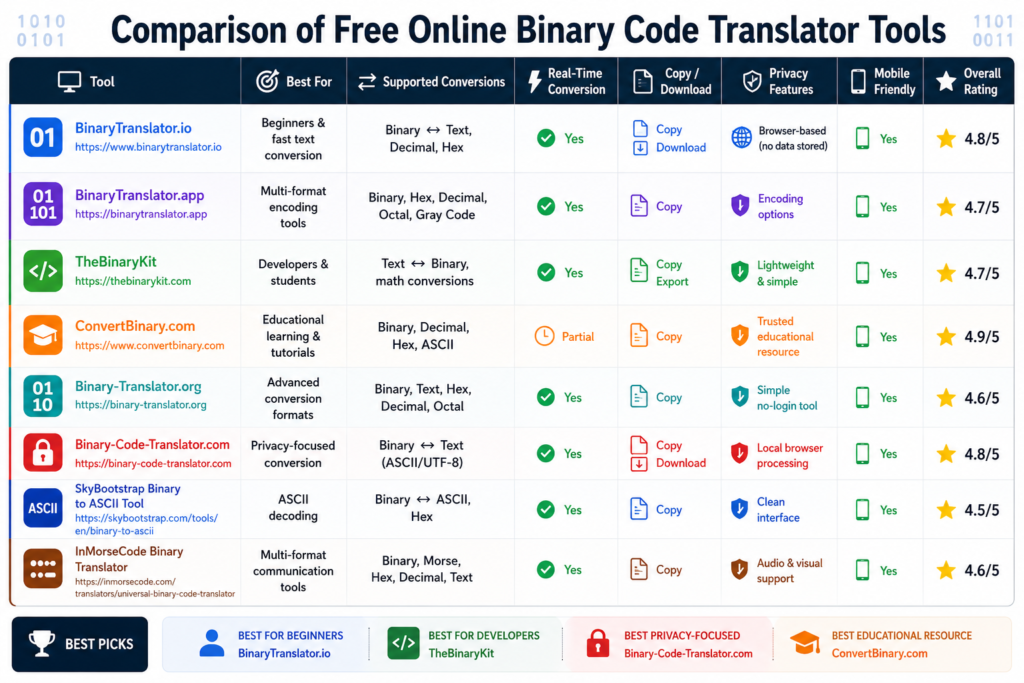
We tested four reliable, no‑login‑required tools. Here’s how they stack up.
| Tool | Max Input Size | Supports Spaces Between Bytes | Extra Features |
|---|---|---|---|
| RapidTables | Unlimited | Yes | Live conversion, binary to hex, binary to decimal |
| QBit BinText | Moderate | Yes (space‑separated) | Simple, lightweight, also text‑to‑binary |
| PrepostSEO Binary Translator | 1000 characters | Yes | Also offers binary to decimal/octal/hex, clean UI |
| ConvertBinary | Unlimited | Yes | Detailed explanations, binary alphabet, text‑to‑binary |
Our recommendation:
- For quick, ad‑free conversions, RapidTables and QBit BinText are excellent.
- PrepostSEO adds extra number‑system conversions and a polished interface.
- ConvertBinary is ideal for beginners because it includes educational charts and examples.
All four are free tools and work directly in your browser without installation.
5. HOW TO USE A BINARY CODE TRANSLATOR: STEP‑BY‑STEP GUIDE
(This section maps to the HowTo schema.)
Step 1 – Gather your binary string.
Binary is typically written in groups of 8 bits (1 byte), separated by spaces for readability. Example: 01001000 01100101 01101100 01101100 01101111.
Step 2 – Open a trusted online binary translator.
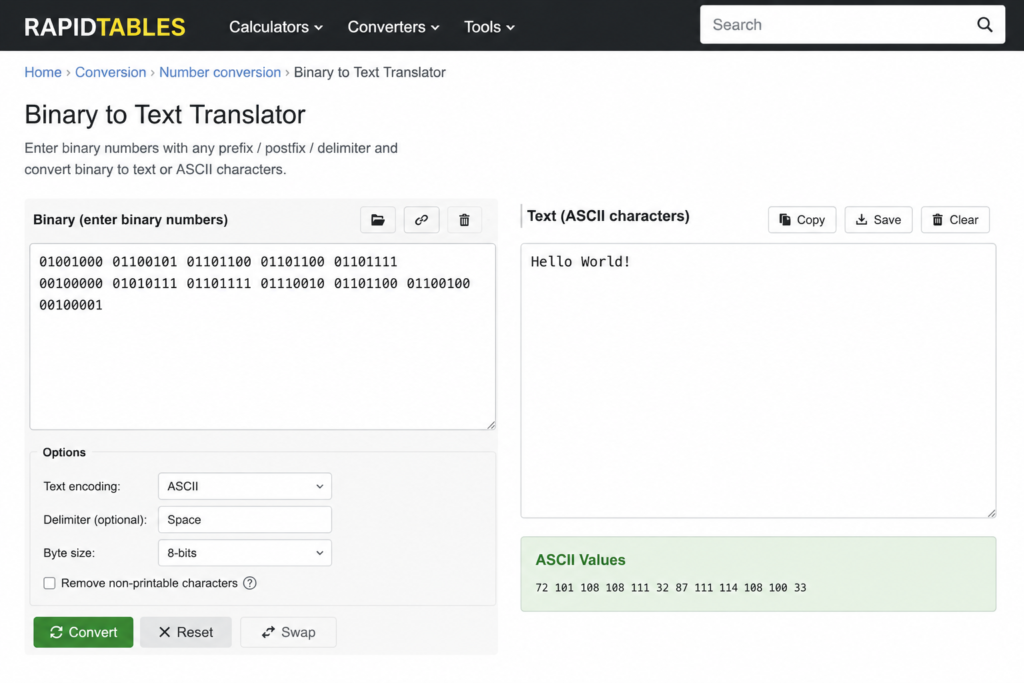
Use one of the recommended tools, such as RapidTables (binary to ASCII page). The link is provided at the end of this guide.
Step 3 – Paste the binary into the input field.
Most tools have a large text area. Paste your binary string as is. The tool will automatically process it (or you may need to click a “Convert” button).
Step 4 – Click “Translate” or “Decode.”
The output appears instantly in the adjacent box, showing the plain text equivalent.
Step 5 – Verify the output.
Copy the decoded text and use the tool’s reverse function (Text to Binary) to re‑encode it. The binary should match your original input, confirming accuracy.
Step 6 – Copy the decoded text.
Use the copy button or manually select the text. It’s now ready for your document, email, or code.

6. MANUAL BINARY‑TO‑TEXT CONVERSION (NO TOOL REQUIRED)
If you ever need to decode binary without internet access, here’s a simple manual method.
You’ll need: an ASCII table (easily found online) or the ability to remember a few key values.
Step 1 – Split the binary string into 8‑bit chunks (each chunk = 1 byte). If there are spaces, they mark the divisions.
Step 2 – For each 8‑bit group, calculate its decimal value using the powers of 2:
Positions (left to right): 128, 64, 32, 16, 8, 4, 2, 1.
Write the bits underneath. Add the position values where there is a “1.”
Example: 01001000 → 64 + 8 = 72 → which is the decimal code for ‘H’.
Step 3 – Look up the decimal value in an ASCII table. The character at that code is your decoded letter.
Step 4 – Repeat for all bytes. The joined characters form your message.
While tedious for large texts, this method gives you a deep understanding of exactly how a binary translator works.
7. REAL‑WORLD APPLICATIONS OF BINARY TRANSLATION
- Software debugging – binary dumps reveal hidden data or malformed input.
- Cryptography – hashing algorithms produce binary (or hexadecimal) output that you may need to interpret.
- Digital forensics – analysing file signatures in binary can help recover lost data.
- Education – teachers use binary exercises to explain data representation.
- Fun & puzzles – many online challenges hide messages in binary, especially in “escape room” games.
- Programming – converting binary strings to text inside scripts (e.g.,
String.fromCharCode(parseInt('01001000',2))in JavaScript).
A reliable binary code translator is a valuable tool in all these scenarios.
8. COMMON MISTAKES AND TROUBLESHOOTING
- Missing or incorrect byte grouping – binary must be grouped in 8‑bit bytes. A stray space or missing bit will break the translation. If your output looks wrong, check the grouping.
- Confusing binary with other bases –
101could be binary (5 in decimal) or just the number one hundred one. Always ensure your input is clearly binary (only 0s and 1s). - Encoding mismatch – ASCII only covers characters 0–127. If your text includes accented letters or emojis, you need a translator that supports UTF‑8. Standard ASCII tools will show garbled output.
- Not testing the reverse – always re‑encode the text back to binary to confirm the translation is lossless. If it doesn’t match, your input was likely malformed.
- Tool overload – some sites inject ads or ask for logins. Stick to the four recommended translators to avoid security risks.
9. FREQUENTLY ASKED QUESTIONS
1. What is a binary code translator?
A binary code translator is a tool or method that converts binary sequences (0s and 1s) into human‑readable text, typically using ASCII or Unicode encoding. It can be an online converter, a software program, or even a manual calculation process.
2. How does binary code translate to text?
Binary code translates to text through character encoding standards like ASCII. Each 8‑bit binary byte corresponds to a decimal number, which maps to a specific character. The translator performs this mapping automatically.
3. Which is the best free binary code translator online?
RapidTables and QBit BinText are excellent for quick, ad‑free translations. ConvertBinary is best for beginners because it includes educational charts, while PrepostSEO offers extra conversion options.
4. Can I translate binary code without a tool?
Yes, you can manually convert binary to text by splitting the string into 8‑bit bytes, calculating the decimal value of each byte using powers of 2, and looking up the corresponding character in an ASCII table.
5. How do I convert binary to English text?
Paste your binary string into an online translator, ensuring the bytes are separated by spaces if the tool requires it. Click convert, and the English text will appear instantly.
6. What is the difference between 7‑bit and 8‑bit binary?
7‑bit binary represents values 0–127 (original ASCII), while 8‑bit binary extends to 0–255, covering extended ASCII and additional symbols. Most modern translators use 8‑bit groups.
7. How does a computer understand binary?
Computers use millions of tiny switches called transistors that represent 0s and 1s. The CPU processes these binary signals according to stored instructions, and software translates the binary patterns into text, images, and other data.
8. Can binary code contain spaces?
Spaces are not part of the binary data itself; they are added for human readability to separate 8‑bit bytes. Most translators accept input with or without spaces, but consistent separation helps avoid errors.
9. Is binary used in modern programming?
Yes, binary is fundamental. Programmers work with binary at the bit‑wise operation level, and binary file formats are common. However, they usually use hexadecimal or decimal for convenience, but binary underlies everything.
10. How do I translate binary to other number systems (hex, decimal)?
Many online translators (like RapidTables and PrepostSEO) include built‑in converters for binary to decimal, hexadecimal, and octal. You can also manually convert by grouping binary digits appropriately.
10. CONCLUSION
Whether you’re decoding a cryptic message, learning computer science fundamentals, or debugging raw data, a binary code translator is your direct bridge from machine language to human understanding. The free online tools we’ve covered make the process instant, and the manual method gives you full control when you’re offline.
Remember: valid binary input is always a multiple of 8 bits, space‑separated for clarity. Stick to trusted translators, verify your output, and never confuse encoding standards.
Bookmark this guide for quick reference, and when you’re ready to explore more, try our collection of free text and number converters.
I